
In this project we aim to create an end-to-end solution using SQL, Power BI, and Python, providing valuable insights to help the FinTech company in India make informed decisions and optimize their loan approval process.
Table of contents
- 00. Project Overview
- 01. Data Overview & Preparation
- 02. Data Cleaning & Transformation - SQL
- 03. Exploratory Data Analysis - PowerBI
- 04. Predictive Modelling - Python
- 05. Conclusion
- 06. Growth & Next Steps
Project Overview
Context
A fintech company operating in India wants to optimize its loan approval process. They receive a large volume of loan applications daily and want to improve their approval process to reduce the risk of defaults while ensuring fair and timely approval decisions.
I will build an ML model that would help the company to assess the creditworthiness of future applicants which would help them process loans faster.
Actions
I’ve peformed data cleaning using SQL and exploratory data analysis using PowerBI and found out that cibil_score is not the only contributor to the loan approval. Moreover, Approximately 62.2% of the loans in the dataset are approved (2656 out of 4,269), indicating a moderate class imbalance.
Even so, I make sure to not rely on classification accuracy alone when assessing results - also analysing Precision, Recall, and F1-Score.
As I am predicting a binary output, I tested four classification modelling approaches, namely:
- Logistic Regression
- Decision Tree
- Random Forest
- K Nearest Neighbours (KNN)
For each model, I will import the data in the same way but will need to pre-process the data based up the requirements of each particular algorithm. I will train & test each model, look to refine each to provide optimal performance, and then measure this predictive performance based on several metrics to give a well-rounded overview of which is best.
Results
Based on the exploratory data analysis performed using SQL, PowerBI and Python it is found that the major factors affecting the loan approval or rejection are
- Cibil_score
- annual_income
- loan_term
The goal was to build a model that would accurately predict the loan_status which will be helpful in determining the creditworthiness of future applicants.
The chosen model is the Random Forest as it was
a) the most consistently performant on the test set across classification accuracy, precision, recall, and f1-score.
b) the feature importance and permutation importance allows the client an understanding of the key drivers behind loan_status.
Metric 1: Classification Accuracy
- Random Forest = 0.985
- Decision Tree = 0.968
- Logistic Regression = 0.917
- KNN = 0.876
Metric 2: Precision
- Random Forest = 0.985
- Decision Tree = 0.983
- Logistic Regression = 0.921
- KNN = 0.903
Metric 3: Recall
- Random Forest = 0.991
- Decision Tree = 0.966
- Logistic Regression = 0.947
- KNN = 0.896
Metric 4: F1 Score
- Random Forest = 0.988
- Decision Tree = 0.974
- Logistic Regression = 0.934
- KNN = 0.900
Growth & Next Steps
While predictive accuracy was relatively high - other modelling approaches could be tested, especially those somewhat similar to Random Forest, for example XGBoost, LightGBM to see if even more accuracy could be gained.
While the model demonstrates strong performance, further improvements can be made by incorporating additional relevant features such as alternative credit signals (e.g., transaction behavior, repayment history, or digital footprint data). Additionally, advanced feature engineering techniques and hyperparameter tuning can be applied to further enhance model performance.
Additionally, Validation using time-based splits or evaluation on recent loan application data prior to deployment is recommended to ensure the model generalizes well to future applicants and evolving credit risk dynamics.
From a business perspective, optimizing the classification threshold to reduce false positives (i.e., approving risky applicants) would be critical to minimize financial losses because Saving from bad loans ( False positives ) > losing some good customers ( False negatives )
While the model is already well balanced in terms of false positives and false negatives, from a business perspective, further optimization of the decision threshold can be explored depending on the company’s risk appetite. In lending scenarios, reducing false positives (approving risky applicants) may be prioritized even at the cost of slightly increasing false negatives.
Continuous monitoring and periodic retraining of the model will be important to capture changing borrower behavior, economic conditions, and credit risk patterns over time, ensuring the model maintains its predictive performance and reliability
Data Overview & Preparation
This data includes information such as applicant details, financial history, loan amounts, interest rates, and whether the loan was approved or not.
In the code below, we:
- Import the required data in excel
click the column header or use "CTRL+A". The status bar, in the lower-right corner of your Excel window, will tell you the below row count

>> 4269
A sample of this data (the first 5 rows) can be seen below:
Data Dictionary
- loan_id - Loan ID of the applicant.
- no_of_dependents - Number of Dependents for the person.
- gender - Refers to the gender of the person i.e ‘male’ or ‘female’
- education - Refers to the education.
- self_employed - whether the person is self-employed or not.
- income_annum - Refers to the yearly income of the person.
- loan_amount - Refers to the loan amount disbursed.
- loan_term_yrs - Refers to the loan term in years.
- cibil_score - This is a cibil score of the person.
- residential_assets_value - Refers to the price of residential assets such as apartment, villa etc.
- commercial_assets_value - Refers to the price of commerical assets such as offices, medical centres, hotels, malls etc.
- luxury_assets_value - Refers to the price of luxury assets such as luxury cars or items.
- bank_asset_value - Refers how much money is in the bank including bank shares, Fixed deposits etc.
- loan_status - Refers to the status of the loan whether it is approved or not.
Data Cleaning & Transformation - SQL
We created an empty_table named loan_applications with specified columns and datatypes to match the columns of the excel dataset while importing it.
Import the excel dataset into the SQL database by
- Right click on Tables and select Table Data Import Wizard.
- Select the file path and click on “Next”.
- Select Use existing table because you already created a skeleton of it and click on “Next”.
- You can see the column names and values. Just click “Next” again. Data will be imported successfully.
CREATE TABLE loan_applications (
    loan_id INT PRIMARY KEY,
    no_of_dependents INT,
    education VARCHAR(50),
    gender VARCHAR(10),
    self_employed VARCHAR(10),
    income_annum DECIMAL(10, 2),
    loan_amount DECIMAL(10, 2),
    loan_term INT,
    cibil_score INT,
    residential_assets_value DECIMAL(10, 2),
    commercial_assets_value DECIMAL(10, 2),
    luxury_assets_value DECIMAL(10, 2),
    bank_asset_value DECIMAL(10, 2),
    loan_status VARCHAR(20)
);

# Checking for blank spaces in loan_status column

select loan_status from loan_applications
where substring(loan_status,1,1)=' ';
Output: A sample of first 5 rows is displayed below
| loan_status |
|---|
| Approved |
| Rejected |
| Rejected |
| Rejected |
| Rejected |
It seems the column loan_status has leading blank spaces.
select education from loan_applications
where substring(education,1,1)=' ';
Output: A sample of first 5 rows is displayed below
| education |
|---|
| Not Graduate |
| Not Graduate |
| Not Graduate |
| Not Graduate |
| Not Graduate |
The education column has leading blank spaces.
select gender from loan_applications
where substring(gender,1,1)=' ';
Output: A sample of first 5 rows is displayed below
| gender |
|---|
| Male |
| Male |
| Male |
| Female |
| Male |
The column gender has leading blank spaces.
select self_employed from loan_applications
where substring(self_employed,1,1)=' ';
Output: A sample of first 5 rows is displayed below
| gender |
|---|
| No |
| Yes |
| No |
| No |
| Yes |
The column gender has leading blank spaces.
CREATE TABLE loan_application_details
AS
SELECT
	loan_id,
    no_of_dependents,
    TRIM(gender) AS gender,
    TRIM(education) AS education,
    TRIM(self_employed) AS self_employed,
    ROUND(income_annum,2) AS income_annum,
	CASE
        WHEN income_annum >= 0 AND income_annum <= 999999 THEN '0-10 Lacs'
        WHEN income_annum >= 1000000 AND income_annum <= 1999999 THEN '10-20 Lacs'
        WHEN income_annum >= 2000000 AND income_annum <= 2999999 THEN '20-30 Lacs'
        WHEN income_annum >= 3000000 AND income_annum <= 3999999 THEN '30-40 Lacs'
        WHEN income_annum >= 4000000 AND income_annum <= 4999999 THEN '40-50 Lacs'
        WHEN income_annum >= 5000000 AND income_annum <= 5999999 THEN '50-60 Lacs'
        WHEN income_annum >= 6000000 AND income_annum <= 6999999 THEN '60-70 Lacs'
        WHEN income_annum >= 7000000 AND income_annum <= 7999999 THEN '70-80 Lacs'
        WHEN income_annum >= 8000000 AND income_annum <= 8999999 THEN '80-90 Lacs'
        WHEN income_annum >= 9000000 AND income_annum <= 9999999 THEN '90 Lacs+'
        ELSE 'Unknown' -- Handle any other cases if necessary
    END AS income_annum_group_lacs,
    ROUND(loan_amount,2) AS loan_amount,
	CASE
        WHEN loan_amount >= 0 AND loan_amount <= 4999999 THEN '0-0.5'
        WHEN loan_amount >= 5000000 AND loan_amount <= 9999999 THEN '0.5-1'
        WHEN loan_amount >= 10000000 AND loan_amount <= 14999999 THEN '1-1.5'
        WHEN loan_amount >= 15000000 AND loan_amount <= 19999999 THEN '1.5-2'
        WHEN loan_amount >= 20000000 AND loan_amount <= 24999999 THEN '2-2.5'
        WHEN loan_amount >= 25000000 AND loan_amount <= 29999999 THEN '2.5-3'
        WHEN loan_amount >= 30000000 AND loan_amount <= 34999999 THEN '3-3.5'
        WHEN loan_amount >= 35000000 AND loan_amount <= 39999999 THEN '3.5+'
        ELSE 'Unknown' -- Handle any other cases if necessary
    END AS loan_amount_group,
    loan_term,
    cibil_score,
    CASE
        WHEN cibil_score BETWEEN 300 AND 549 THEN 'Low'
        WHEN cibil_score BETWEEN 550 AND 649 THEN 'Fair'
        WHEN cibil_score BETWEEN 650 AND 749 THEN 'Good'
        WHEN cibil_score BETWEEN 750 AND 900 THEN 'Excellent'
        ELSE 'Unknown' -- Handle any other cases if necessary
    END AS cibil_score_category,
    ROUND(residential_assets_value,2) AS residential_assets_value,
	CASE
		WHEN residential_assets_value < 0 THEN 'negative_value'
        WHEN residential_assets_value = 0 THEN 'zero_value'
        WHEN residential_assets_value >= 1 AND residential_assets_value <= 4999999 THEN '0-0.5'
        WHEN residential_assets_value >= 5000000 AND residential_assets_value <= 9999999 THEN '0.5-1'
        WHEN residential_assets_value >= 10000000 AND residential_assets_value <= 14999999 THEN '1-1.5'
        WHEN residential_assets_value >= 15000000 AND residential_assets_value <= 19999999 THEN '1.5-2'
        WHEN residential_assets_value >= 20000000 AND residential_assets_value <= 24999999 THEN '2-2.5'
        WHEN residential_assets_value >= 25000000 AND residential_assets_value <= 29999999 THEN '2.5-3'
        WHEN residential_assets_value >= 30000000 AND residential_assets_value <= 34999999 THEN '3-3.5'
        WHEN residential_assets_value >= 35000000 AND residential_assets_value <= 39999999 THEN '3.5+'
        ELSE 'Unknown' -- Handle any other cases if necessary
    END AS residential_assets_value_group,
    ROUND(commercial_assets_value,2) AS commercial_assets_value,
	CASE
		WHEN commercial_assets_value < 0 THEN 'negative_Value'
        WHEN commercial_assets_value = 0 THEN 'zero_value'
        WHEN commercial_assets_value >= 1 AND commercial_assets_value <= 4999999 THEN '0-0.5'
        WHEN commercial_assets_value >= 5000000 AND commercial_assets_value <= 9999999 THEN '0.5-1'
        WHEN commercial_assets_value >= 10000000 AND commercial_assets_value <= 14999999 THEN '1-1.5'
        WHEN commercial_assets_value >= 15000000 AND commercial_assets_value <= 19999999 THEN '1.5-2'
        WHEN commercial_assets_value >= 20000000 AND commercial_assets_value <= 24999999 THEN '2-2.5'
        WHEN commercial_assets_value >= 25000000 AND commercial_assets_value <= 29999999 THEN '2.5-3'
        WHEN commercial_assets_value >= 30000000 AND commercial_assets_value <= 34999999 THEN '3-3.5'
        WHEN commercial_assets_value >= 35000000 AND commercial_assets_value <= 39999999 THEN '3.5+'
        ELSE 'Unknown' -- Handle any other cases if necessary
    END AS commercial_assets_value_group,
	ROUND(luxury_assets_value,2) AS luxury_assets_value,
	CASE
		WHEN luxury_assets_value < 0 THEN 'negative_Value'
        WHEN luxury_assets_value = 0 THEN 'zero_value'
        WHEN luxury_assets_value >= 1 AND luxury_assets_value <= 4999999 THEN '0-0.5'
        WHEN luxury_assets_value >= 5000000 AND luxury_assets_value <= 9999999 THEN '0.5-1'
        WHEN luxury_assets_value >= 10000000 AND luxury_assets_value <= 14999999 THEN '1-1.5'
        WHEN luxury_assets_value >= 15000000 AND luxury_assets_value <= 19999999 THEN '1.5-2'
        WHEN luxury_assets_value >= 20000000 AND luxury_assets_value <= 24999999 THEN '2-2.5'
        WHEN luxury_assets_value >= 25000000 AND luxury_assets_value <= 29999999 THEN '2.5-3'
        WHEN luxury_assets_value >= 30000000 AND luxury_assets_value <= 34999999 THEN '3-3.5'
        WHEN luxury_assets_value >= 35000000 AND luxury_assets_value <= 39999999 THEN '3.5+'
        ELSE 'Unknown' -- Handle any other cases if necessary
    END AS luxury_assets_value_group,
	ROUND(bank_asset_value,2) AS bank_asset_value,
	CASE
		WHEN bank_asset_value < 0 THEN 'negative_value'
        WHEN bank_asset_value = 0 THEN 'zero_value'
        WHEN bank_asset_value >= 1 AND bank_asset_value <= 4999999 THEN '0-0.5'
        WHEN bank_asset_value >= 5000000 AND bank_asset_value <= 9999999 THEN '0.5-1'
        WHEN bank_asset_value >= 10000000 AND bank_asset_value <= 14999999 THEN '1-1.5'
        WHEN bank_asset_value >= 15000000 AND bank_asset_value <= 19999999 THEN '1.5-2'
        WHEN bank_asset_value >= 20000000 AND bank_asset_value <= 24999999 THEN '2-2.5'
        WHEN bank_asset_value >= 25000000 AND bank_asset_value <= 29999999 THEN '2.5-3'
        WHEN bank_asset_value >= 30000000 AND bank_asset_value <= 34999999 THEN '3-3.5'
        WHEN bank_asset_value >= 35000000 AND bank_asset_value <= 39999999 THEN '3.5+'
        ELSE 'Unknown' -- Handle any other cases if necessary
    END AS bank_asset_value_group,
    TRIM(loan_status) AS loan_status
FROM loan_applications;
We have created a new table called loan_application_details which contains no blank values in columns and performed feature engineering on some columns.
- We removed the leading blank spaces using TRIM command of all the categorical variables such as gender, education, self_employed and loan_status.
- We have put cibil_score under categories use CASE statements because there are different categories defined by government of India like for example cibil score above 690 or 700 is Excellent and there are also specified ranges for Good, Fair and Low.
- We created bins/categories for columns such as income_annum, loan_amount, residential_assests_value, commercial_assets_value, luxury_asset_value and bank_asset_value because it will be helpful to view the distributions by categories when creating a dashboard.
SELECT * FROM loan_application_details;
Output: A sample of first 5 rows of 21 columns is displayed below
| loan_id | no_of_dependents | gender | education | self_employed | income_annum | income_annum_group_lacs |
|---|---|---|---|---|---|---|
| 1 | 2 | Male | Post Graduate | No | 9600000 | 90 Lacs+ |
| 2 | 0 | Male | Post Graduate | Yes | 4100000 | 40-50 Lacs |
| 3 | 3 | Male | Post Graduate | No | 9100000 | 90 Lacs+ |
| 4 | 3 | Female | Post Graduate | No | 8200000 | 80-90 Lacs |
| 5 | 5 | Male | Post Graduate | Yes | 9800000 | 90 Lacs+ |
| loan_amount | loan_amount_group | loan_term | cibil_score | cibil_score_category | residential_assets_value | residential_assets_value_group |
|---|---|---|---|---|---|---|
| 29900000 | 2.5-3 | 12 | 778 | Excellent | 2400000 | 0-0.5 |
| 12200000 | 1-1.5 | 8 | 417 | Low | 2700000 | 0-0.5 |
| 29700000 | 2.5-3 | 20 | 506 | Low | 7100000 | 0.5-1 |
| 30700000 | 3-3.5 | 8 | 467 | Low | 18200000 | 1.5-2 |
| 24200000 | 2-2.5 | 20 | 382 | Low | 12400000 | 1-1.5 |
| comm_assets_value | comm_assets_group | luxury_assets_val | luxury_assets_group | bank_asset_val | bank_asset_group | loan_status |
|---|---|---|---|---|---|---|
| 17600000 | 1.5-2 | 22700000 | 2-2.5 | 8000000 | 0.5-1 | Approved |
| 2200000 | 0-0.5 | 8800000 | 0.5-1 | 3300000 | 0-0.5 | Rejected |
| 4500000 | 0-0.5 | 33300000 | 3-3.5 | 12800000 | 1-1.5 | Rejected |
| 3300000 | 0-0.5 | 23300000 | 2-2.5 | 7900000 | 0.5-1 | Rejected |
| 8200000 | 0.5-1 | 29400000 | 2.5-3 | 5000000 | 0.5-1 | Rejected |
This cleaned dataset can be used for further analysis.
Note:
- For the column residential_assets_value, there are negative numbers and zero present in it. Zero means no residential assets available and negative number means there is already a home loan going on.
Finding Approval & Rejection applications and rates
SELECT *, ROUND((approved_applications/total_applications)*100,2) AS approval_rate
FROM
(SELECT
	COUNT(*) AS total_applications,
    SUM(CASE WHEN loan_status = 'Approved' THEN 1 ELSE 0 END) AS approved_applications,
    SUM(CASE WHEN loan_status = 'Rejected' THEN 1 ELSE 0 END) AS rejected_applications
FROM loan_application_details) a;
Output:
| total_applications | approved_applications | rejected_applications | approval_rate | rejection_rate |
|---|---|---|---|---|
| 4269 | 2656 | 1613 | 62.22 | 37.78 |
- approval_rate is 62.22%
- rejection_rate is 37.78%
SELECT
    'Approved' AS "loan_status/gender",
    SUM(CASE WHEN gender = 'Female' AND loan_status = 'Approved' THEN 1 ELSE 0 END) AS "Female",
    SUM(CASE WHEN gender = 'Male' AND loan_status = 'Approved' THEN 1 ELSE 0 END) AS "Male"
FROM loan_application_details
UNION ALL
SELECT
    'Rejected' AS "loan_status/gender",
    SUM(CASE WHEN gender = 'Female' AND loan_status = 'Rejected' THEN 1 ELSE 0 END) AS "Female",
    SUM(CASE WHEN gender = 'Male' AND loan_status = 'Rejected' THEN 1 ELSE 0 END) AS "Male"
FROM loan_application_details;
Output:
| loan_status/gender | Female | Male |
|---|---|---|
| Approved | 1374 | 1282 |
| Rejected | 833 | 780 |
- Majority of the females got approved as well as rejected for loans compared to the males.
SELECT
    'Approved' AS "loan_status/education",
    SUM(CASE WHEN education = 'Graduate' AND loan_status = 'Approved' THEN 1 ELSE 0 END) AS "Graduate",
    SUM(CASE WHEN education = 'Not Graduate' AND loan_status = 'Approved' THEN 1 ELSE 0 END) AS "Not Graduate",
    SUM(CASE WHEN education = 'Post Graduate' AND loan_status = 'Approved' THEN 1 ELSE 0 END) AS "Post Graduate"
FROM loan_application_details
UNION ALL
SELECT
    'Rejected' AS "loan_status/education",
    SUM(CASE WHEN education = 'Graduate' AND loan_status = 'Rejected' THEN 1 ELSE 0 END) AS "Graduate",
    SUM(CASE WHEN education = 'Not Graduate' AND loan_status = 'Rejected' THEN 1 ELSE 0 END) AS "Not Graduate",
    SUM(CASE WHEN education = 'Post Graduate' AND loan_status = 'Rejected' THEN 1 ELSE 0 END) AS "Post Graduate"
FROM loan_application_details;
Output:
| loan_status/education | Graduate | Not Graduate | Post Graduate |
|---|---|---|---|
| Approved | 1288 | 1251 | 117 |
| Rejected | 771 | 621 | 221 |
- Majority of the applicants who did post graduate got rejected.
- Majority of the applicants who did not graduate has got the loan approved.
SELECT
    'Approved' AS "loan_status/self-employed",
    SUM(CASE WHEN self_employed = 'No' AND loan_status = 'Approved' THEN 1 ELSE 0 END) AS "No",
    SUM(CASE WHEN self_employed = 'Yes' AND loan_status = 'Approved' THEN 1 ELSE 0 END) AS "Yes"
FROM loan_application_details
UNION ALL
SELECT
    'Rejected' AS "loan_status/self-employed",
    SUM(CASE WHEN self_employed = 'No' AND loan_status = 'Rejected' THEN 1 ELSE 0 END) AS "No",
    SUM(CASE WHEN self_employed = 'Yes' AND loan_status = 'Rejected' THEN 1 ELSE 0 END) AS "Yes"
FROM loan_application_details;
Output:
| loan-status/self-employed | No | Yes |
|---|---|---|
| Approved | 1318 | 1338 |
| Rejected | 801 | 812 |
- The proportion of getting approved or rejected is almost equal aka 50% for the people who are and not self-employed.
SELECT
    'Approved' AS "loan_status/cibil_score",
    SUM(CASE WHEN cibil_score_category = 'Excellent' AND loan_status = 'Approved' THEN 1 ELSE 0 END) AS "Excellent",
    SUM(CASE WHEN cibil_score_category = 'Good' AND loan_status = 'Approved' THEN 1 ELSE 0 END) AS "Good",
    SUM(CASE WHEN cibil_score_category = 'Fair' AND loan_status = 'Approved' THEN 1 ELSE 0 END) AS "Fair",
	SUM(CASE WHEN cibil_score_category = 'Low' AND loan_status = 'Approved' THEN 1 ELSE 0 END) AS "Low"
FROM loan_application_details
UNION ALL
SELECT
    'Rejected' AS "loan_status/cibil_score",
    SUM(CASE WHEN cibil_score_category = 'Excellent' AND loan_status = 'Rejected' THEN 1 ELSE 0 END) AS "Excellent",
    SUM(CASE WHEN cibil_score_category = 'Good' AND loan_status = 'Rejected' THEN 1 ELSE 0 END) AS "Good",
    SUM(CASE WHEN cibil_score_category = 'Fair' AND loan_status = 'Rejected' THEN 1 ELSE 0 END) AS "Fair",
	SUM(CASE WHEN cibil_score_category = 'Low' AND loan_status = 'Rejected' THEN 1 ELSE 0 END) AS "Low"
FROM loan_application_details;
Output:
| loan_status/cibil_score | Excellent | Good | Fair | Low |
|---|---|---|---|---|
| Approved | 1050 | 740 | 681 | 185 |
| Rejected | 6 | 5 | 2 | 1600 |
- There are 6 applications who have excellent cibil_score but still got rejected.
- Majority of applicants who have low cibil_score got rejected but a group of people got approved.
So cibil_score is not the most contributing factor but one of the factor.
Exploratory Data Analysis - PowerBI
Extracting Observations
- Approximately 62.2% of the loans in the dataset are approved (2656 out of 4,269), indicating a moderate class imbalance. While the imbalance is not severe enough to mandate resampling techniques, it is important to monitor its impact on model performance and ensure that evaluation metrics such as precision and recall are carefully considered.
- Cibil score aka credit scores, particularly in the range of 540-550, serve as a distinct threshold for separating loan statuses.
- The loan_status is highly correlated with cibil scores, but some applicants with high cibil scores ( above 740 ) were still rejected, suggesting additional factors influencing loan approval.
- No clear trends were observed between asset values and loan status, indicating that asset values alone might not be strong indicators of loan approval.
Predictive Modelling - Python
Modelling Overview
We will build a model that looks to accurately predict loan_status, based upon the customer metrics.
If this can be achieved, then it would be helpful in assessing the creditworthiness of future applicants
As we are predicting a binary output, we tested four classification modelling approaches, namely:
- Logistic Regression
- Decision Tree
- Random Forest
- K Nearest Neighbours (KNN)
Data Import & Analysis
from pymysql import connect
import pandas as pd

import pandas as pd
import numpy as np
from scipy import stats

from sklearn.model_selection import train_test_split
from sklearn.preprocessing import StandardScaler
from sklearn.preprocessing import MinMaxScaler

import matplotlib.pyplot as plt
import seaborn as sns

import scipy.stats as stats
from statsmodels.formula.api import ols
import statsmodels.api as sm

from sklearn.preprocessing import OneHotEncoder
from sklearn.feature_selection import RFECV

from sklearn.linear_model import LogisticRegression
from sklearn.metrics import recall_score, precision_score, f1_score, accuracy_score, confusion_matrix
import sklearn.metrics as metrics
from tabulate import tabulate

import warnings

warnings.filterwarnings("ignore")

database = connect(host = 'localhost',
                  user = 'root',
                  password = '',
                  database = 'capstone')

cur = database.cursor()

query = 'SELECT * FROM loan_application_details;'
cur.execute(query)
>> 4269

df = pd.read_sql(query, database)
df.head()
Output: A sample of first 5 rows of 21 columns is displayed below
| loan_id | no_of_dependents | gender | education | self_employed | income_annum | income_annum_group_lacs |
|---|---|---|---|---|---|---|
| 1 | 2 | Male | Post Graduate | No | 9600000.0 | 90 Lacs+ |
| 2 | 0 | Male | Post Graduate | Yes | 4100000.0 | 40-50 Lacs |
| 3 | 3 | Male | Post Graduate | No | 9100000.0 | 90 Lacs+ |
| 4 | 3 | Female | Post Graduate | No | 8200000.0 | 80-90 Lacs |
| 5 | 5 | Male | Post Graduate | Yes | 9800000.0 | 90 Lacs+ |
| loan_amount | loan_amount_group | loan_term | cibil_score | cibil_score_category | residential_assets_value | residential_assets_value_group |
|---|---|---|---|---|---|---|
| 29900000.0 | 2.5-3 | 12 | 778 | Excellent | 2400000.0 | 0-0.5 |
| 12200000.0 | 1-1.5 | 8 | 417 | Low | 2700000.0 | 0-0.5 |
| 29700000.0 | 2.5-3 | 20 | 506 | Low | 7100000.0 | 0.5-1 |
| 30700000.0 | 3-3.5 | 8 | 467 | Low | 18200000.0 | 1.5-2 |
| 24200000.0 | 2-2.5 | 20 | 382 | Low | 12400000.0 | 1-1.5 |
| comm_assets_value | comm_assets_group | luxury_assets_val | luxury_assets_group | bank_asset_val | bank_asset_group | loan_status |
|---|---|---|---|---|---|---|
| 17600000.0 | 1.5-2 | 22700000.0 | 2-2.5 | 8000000.0 | 0.5-1 | Approved |
| 2200000.0 | 0-0.5 | 8800000.0 | 0.5-1 | 3300000.0 | 0-0.5 | Rejected |
| 4500000.0 | 0-0.5 | 33300000.0 | 3-3.5 | 12800000.0 | 1-1.5 | Rejected |
| 3300000.0 | 0-0.5 | 23300000.0 | 2-2.5 | 7900000.0 | 0.5-1 | Rejected |
| 8200000.0 | 0.5-1 | 29400000.0 | 2.5-3 | 5000000.0 | 0.5-1 | Rejected |
df.info()
Output:
| Column | Non-Null Count | Dtype |
|---|---|---|
| loan_id | 4269 non-null | int64 |
| no_of_dependents | 4269 non-null | int64 |
| gender | 4269 non-null | object |
| education | 4269 non-null | object |
| self_employed | 4269 non-null | object |
| income_annum | 4269 non-null | float64 |
| income_annum_group_lacs | 4269 non-null | object |
| loan_amount | 4269 non-null | float64 |
| loan_amount_group | 4269 non-null | object |
| loan_term | 4269 non-null | int64 |
| cibil_score | 4269 non-null | int64 |
| cibil_score_category | 4269 non-null | object |
| residential_assets_value | 4269 non-null | float64 |
| residential_assets_value_group | 4269 non-null | object |
| commercial_assets_value | 4269 non-null | float64 |
| commercial_assets_value_group | 4269 non-null | object |
| luxury_assets_value | 4269 non-null | float64 |
| luxury_assets_value_group | 4269 non-null | object |
| bank_asset_value | 4269 non-null | float64 |
| bank_asset_value_group | 4269 non-null | object |
| loan_status | 4269 non-null | object |
Exploratory Data Analysis
df.isna().sum()
Output:
| loan_id | 0 |
| no_of_dependents | 0 |
| gender | 0 |
| education | 0 |
| self_employed | 0 |
| income_annum | 0 |
| income_annum_group_lacs | 0 |
| loan_amount | 0 |
| loan_amount_group | 0 |
| loan_term | 0 |
| cibil_score | 0 |
| cibil_score_category | 0 |
| residential_assets_value | 0 |
| residential_assets_value_group | 0 |
| commercial_assets_value | 0 |
| commercial_assets_value_group | 0 |
| luxury_assets_value | 0 |
| luxury_assets_value_group | 0 |
| bank_asset_value | 0 |
| bank_asset_value_group | 0 |
| loan_status | 0 |
There are no null values present in the dataset.
# Checking shape of the dataset
df.shape
>> (4269,21)

df["loan_status"].value_counts(normalize = True)
| loan_status | value |
|---|---|
| Approved | 0.62216 |
| Rejected | 0.37784 |
We see that 62% of customers got their loan approved and 37% got rejected. This tells us that while the data isn’t perfectly balanced at 50:50, it isn’t too imbalanced either. Because of this, and as you will see, we make sure to not rely on classification accuracy alone when assessing results - also analysing Precision, Recall, and F1-Score.
sns.scatterplot(x=df['income_annum'], y= df['loan_amount'], hue=df['loan_status'])
plt.title("Loan Status, Loan Amount, Annual Income")
plt.xlabel("Annual Income")
plt.ylabel("Loan Amount")
plt.show()
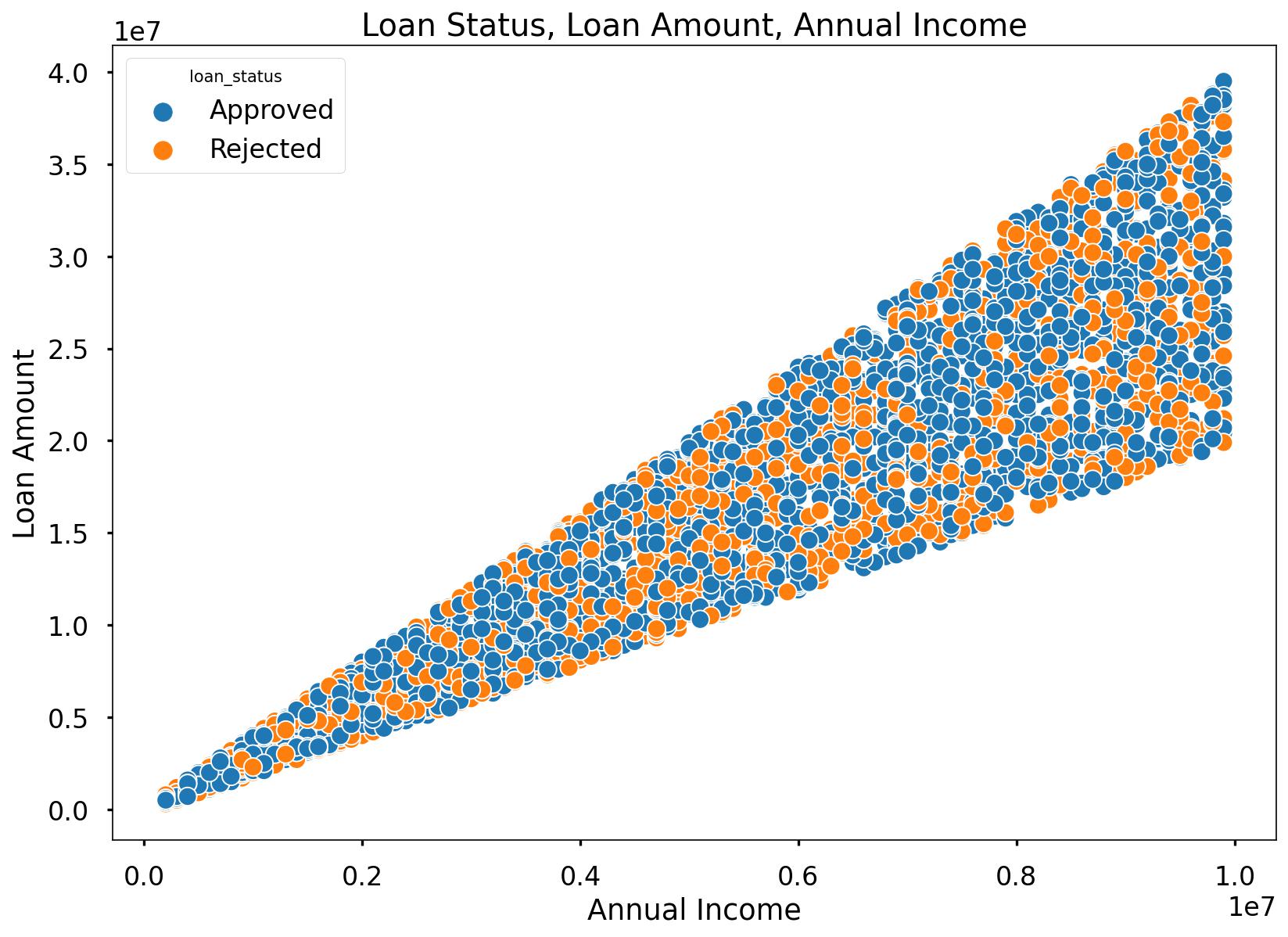
As annual income rises, there is a tendency for the loan amount requested to increase. Notably, even among applicants with the highest annual incomes, some were approved for the highest loan amounts, while others faced rejections. This suggests that loan approval for a specific loan amount is not solely contingent on annual income.
Let’s look at the asset value variables. we will create a subset and get to know the correlation scores between those 4 asset values and other variables.
loan_asset_variables = df[['residential_assets_value', 'commercial_assets_value',
       'luxury_assets_value', 'bank_asset_value', 'no_of_dependents',
       'income_annum', 'loan_amount', 'loan_term', 'cibil_score']]

loan_asset_variables_corr = loan_asset_variables.corr()

sns.heatmap(loan_asset_variables_corr, annot=True, fmt=".2f", cmap="coolwarm")
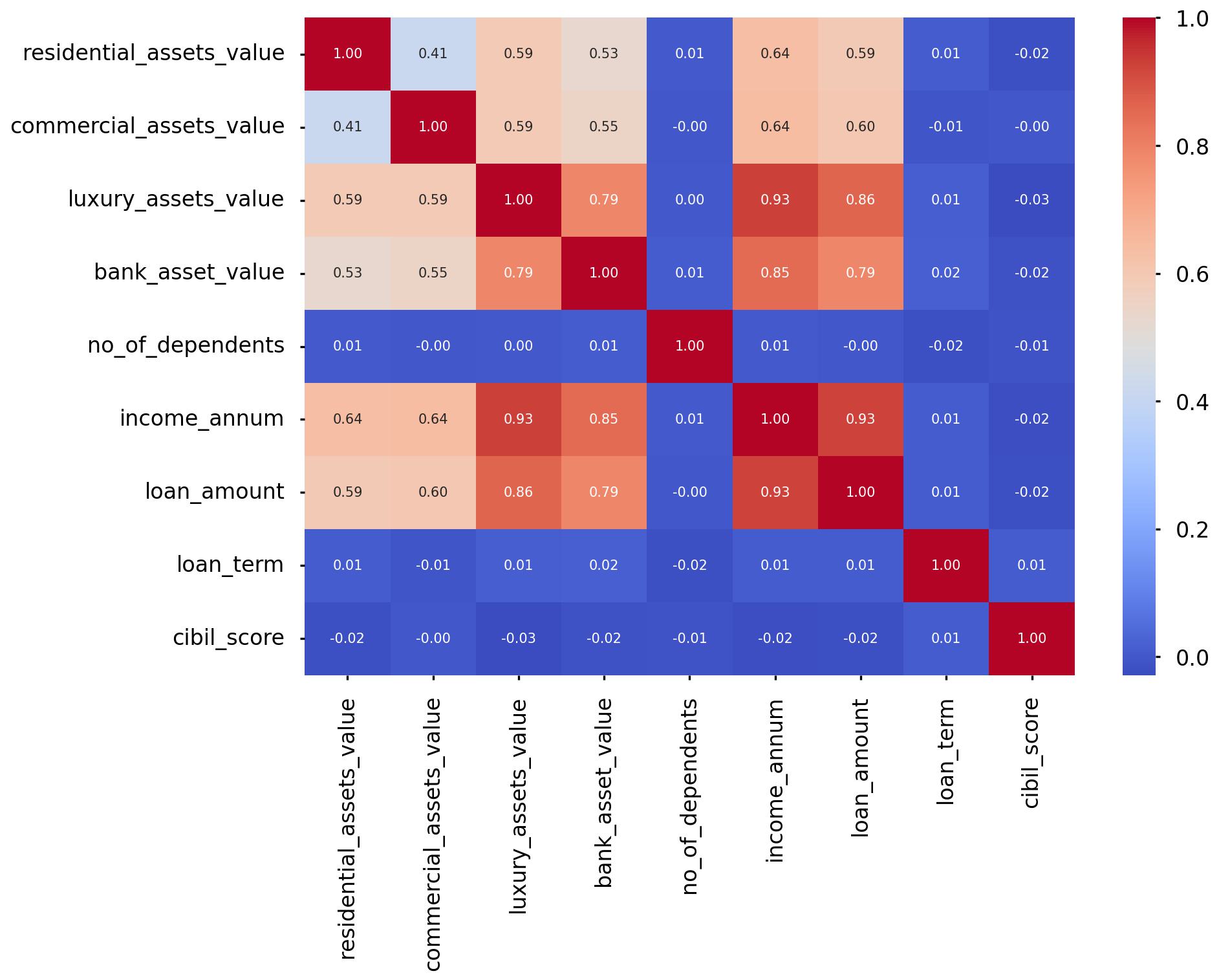
The asset values exhibit moderate to strong positive linear associations with annual income. Applicants with higher annual incomes tend to have greater purchasing power, particularly when it comes to properties with higher asset values, including luxury assets.
loan_term = pd.crosstab(index=df['loan_term'], columns=df['loan_status'])
loan_term['Total'] = loan_term['Approved'] + loan_term['Rejected']
loan_term['Approved_percentage'] = (loan_term['Approved']/loan_term['Total'])*100
loan_term['Rejected_percentage'] = (loan_term['Rejected']/loan_term['Total'])*100
loan_term
Output:
| loan_term | Approved | Rejected | Total | Approved_percentage | Rejected_percentage |
|---|---|---|---|---|---|
| 2 | 315 | 89 | 404 | 77.970297 | 22.029703 |
| 4 | 366 | 81 | 447 | 81.879195 | 18.120805 |
| 6 | 282 | 208 | 490 | 57.551020 | 42.448980 |
| 8 | 220 | 166 | 386 | 56.994819 | 43.005181 |
| 10 | 229 | 207 | 436 | 52.522936 | 47.477064 |
| 12 | 276 | 180 | 456 | 60.526316 | 39.473684 |
| 14 | 239 | 166 | 405 | 59.012346 | 40.987654 |
| 16 | 236 | 176 | 412 | 57.281553 | 42.718447 |
| 18 | 257 | 165 | 422 | 60.900474 | 39.099526 |
| 20 | 236 | 175 | 411 | 57.420925 | 42.579075 |
- It’s evident that shorter loan terms, such as 4, 6, and 8 years, have significantly higher approval percentages (above 56%) compared to longer terms.
- The 4-year term has the highest approval percentage, at 81.88%, suggesting that customers prefer shorter loan durations, possibly due to reduced interest costs.
- Conversely, longer loan terms like 10, 12, and 14 years have higher rejection percentages, with the 14-year term having the highest at 40.99%.
- This implies that customers are more likely to be rejected for loans with longer durations, possibly due to increased credit risk.
- Despite varying approval and rejection percentages, the total number of applications remains relatively consistent, hovering around 400 to 450 applications for most loan terms.
Logistic Regression
df.columns
>> Index(['loan_id', 'no_of_dependents', 'gender', 'education', 'self_employed',
       'income_annum', 'income_annum_group_lacs', 'loan_amount',
       'loan_amount_group', 'loan_term', 'cibil_score', 'cibil_score_category',
       'residential_assets_value', 'residential_assets_value_group',
       'commercial_assets_value', 'commercial_assets_value_group',
       'luxury_assets_value', 'luxury_assets_value_group', 'bank_asset_value',
       'bank_asset_value_group', 'loan_status'],
      dtype='object')

# Removing loan_id
df_model = df[['no_of_dependents', 'gender', 'education', 'self_employed','income_annum', 'loan_amount',
               'loan_term', 'cibil_score','residential_assets_value','commercial_assets_value',
               'luxury_assets_value',  'bank_asset_value', 'loan_status']]

# Label encoding
df_model["loan_status"]= df_model["loan_status"].map({"Approved":1,"Rejected":0})

df_model.info()
Output:
| Column | Non-Null Count | Dtype |
|---|---|---|
| no_of_dependents | 4269 non-null | int64 |
| gender | 4269 non-null | object |
| education | 4269 non-null | object |
| self_employed | 4269 non-null | object |
| income_annum | 4269 non-null | float64 |
| income_annum_group_lacs | 4269 non-null | object |
| loan_amount | 4269 non-null | float64 |
| loan_amount_group | 4269 non-null | object |
| loan_term | 4269 non-null | int64 |
| cibil_score | 4269 non-null | int64 |
| cibil_score_category | 4269 non-null | object |
| residential_assets_value | 4269 non-null | float64 |
| residential_assets_value_group | 4269 non-null | object |
| commercial_assets_value | 4269 non-null | float64 |
| commercial_assets_value_group | 4269 non-null | object |
| luxury_assets_value | 4269 non-null | float64 |
| luxury_assets_value_group | 4269 non-null | object |
| bank_asset_value | 4269 non-null | float64 |
| bank_asset_value_group | 4269 non-null | object |
| loan_status | 4269 non-null | int64 |
Split Out Data For Modelling
In the next code block we do two things, we firstly split our data into an X object which contains only the predictor variables, and a y object that contains only our dependent variable.
Once we have done this, we split our data into training and test sets to ensure we can fairly validate the accuracy of the predictions on data that was not used in training. In this case, we have allocated 80% of the data for training, and the remaining 20% for validation. We make sure to add in the stratify parameter to ensure that both our training and test sets have the same proportion of customers who got approved and rejected of the loan - meaning we can be more confident in our assessment of predictive performance.
# split data into X and y objects for modelling
X = df_model.drop(["loan_status"], axis = 1)
y = df_model["loan_status"]

# split out training & test sets
X_train, X_test, y_train, y_test = train_test_split(X, y, test_size = 0.2, random_state = 42, stratify = y)

print(X_train.shape)
>> (3415, 12)

print(X_test.shape)
>> (854, 12)

print(y_train.shape)
>> (3415,)

print(y_test.shape)
>> (854,)
Categorical Predictor Variables
In our dataset, we have three categorical variables gender, education, self_employed.
The Logistic Regression algorithm can’t deal with data in this format as it can’t assign any numerical meaning to it when looking to assess the relationship between the variable and the dependent variable.
As these three variables doesn’t have any explicit order to it. For example, gender, aka Male isn’t higher or lower than Female and vice versa - one appropriate approach is to apply One Hot Encoding to the categorical column.
One Hot Encoding can be thought of as a way to represent categorical variables as binary vectors, in other words, a set of new columns for each categorical value with either a 1 or a 0 saying whether that value is true or not for that observation. These new columns would go into our model as input variables, and the original column is discarded.
We also drop one of the new columns using the parameter drop = “first”. We do this to avoid the dummy variable trap where our newly created encoded columns perfectly predict each other - and we run the risk of breaking the assumption that there is no multicollinearity, a requirement or at least an important consideration for some models, Linear Regression being one of them! Multicollinearity occurs when two or more input variables are highly correlated with each other, it is a scenario we attempt to avoid as in short, while it won’t neccessarily affect the predictive accuracy of our model, it can make it difficult to trust the statistics around how well the model is performing, and how much each input variable is truly having.
In the code, we also make sure to apply fit_transform to the training set, but only transform to the test set. This means the One Hot Encoding logic will learn and apply the “rules” from the training data, but only apply them to the test data. This is important in order to avoid data leakage where the test set learns information about the training data, and means we can’t fully trust model performance metrics!
For ease, after we have applied One Hot Encoding, we turn our training and test objects back into Pandas Dataframes, with the column names applied.
# list of categorical variables that need encoding
categorical_vars = ["gender","education", "self_employed"]

# instantiate OHE class
one_hot_encoder = OneHotEncoder(sparse=False, drop = "first")

# apply OHE
X_train_encoded = one_hot_encoder.fit_transform(X_train[categorical_vars])
X_test_encoded = one_hot_encoder.transform(X_test[categorical_vars])

# extract feature names for encoded columns
encoder_feature_names = one_hot_encoder.get_feature_names_out(categorical_vars)

# turn objects back to pandas dataframe
X_train_encoded = pd.DataFrame(X_train_encoded, columns = encoder_feature_names)
X_train = pd.concat([X_train.reset_index(drop=True), X_train_encoded.reset_index(drop=True)], axis = 1)
X_train.drop(categorical_vars, axis = 1, inplace = True)

X_test_encoded = pd.DataFrame(X_test_encoded, columns = encoder_feature_names)
X_test = pd.concat([X_test.reset_index(drop=True), X_test_encoded.reset_index(drop=True)], axis = 1)
X_test.drop(categorical_vars, axis = 1, inplace = True)
Feature Scaling
The concept of standardisation comes into picture when continuous independent variables are measured at different scales. A variable called “transaction amount’ that ranges between $100 and $10000 carries more weightage as compared to a variable i.e number of transactions that in general ranges between 0 and 30 because there is a huge magnitude difference between these two variables. Hence, it is required to transform the data to comparable scales for calculation purpose.
The idea is to rescale an original variable to have equal range and/or variance.
# create our standardscaler object
scale_stand = StandardScaler()

# normalise the training set (using fit_transform)
X_train = pd.DataFrame(scale_stand.fit_transform(X_train), columns = X_train.columns)

# normalise the test set (using transform only)
X_test = pd.DataFrame(scale_stand.transform(X_test), columns = X_test.columns)
Feature Selection
Feature Selection is the process used to select the input variables that are most important to your Machine Learning task. It can be a very important addition or at least, consideration, in certain scenarios. The potential benefits of Feature Selection are:
- Improved Model Accuracy - eliminating noise can help true relationships stand out
- Lower Computational Cost - our model becomes faster to train, and faster to make predictions
- Explainability - understanding & explaining outputs for stakeholder & customers becomes much easier
There are many, many ways to apply Feature Selection. These range from simple methods such as a Correlation Matrix showing variable relationships, to Univariate Testing which helps us understand statistical relationships between variables, and then to even more powerful approaches like Recursive Feature Elimination (RFE) which is an approach that starts with all input variables, and then iteratively removes those with the weakest relationships with the output variable.
For our task we applied a variation of Reursive Feature Elimination called Recursive Feature Elimination With Cross Validation (RFECV) where we split the data into many “chunks” and iteratively trains & validates models on each “chunk” seperately. This means that each time we assess different models with different variables included, or eliminated, the algorithm also knows how accurate each of those models was. From the suite of model scenarios that are created, the algorithm can determine which provided the best accuracy, and thus can infer the best set of input variables to use!
# instantiate RFECV & the model type to be utilised
clf = LogisticRegression(random_state = 42, max_iter = 1000)
feature_selector = RFECV(clf)

# fit RFECV onto our training & test data
fit = feature_selector.fit(X_train,y_train)

# extract & print the optimal number of features
optimal_feature_count = feature_selector.n_features_
print(f"Optimal number of features: {optimal_feature_count}")
>> Optimal number of features: 3

X_train_features = X_train.loc[:, feature_selector.get_support()]
X_train_features.columns
>> Index(['income_annum', 'loan_amount', 'cibil_score'], dtype='object')
plt.style.use('seaborn-poster')
plt.plot(range(1, len(fit.cv_results_['mean_test_score']) + 1), fit.cv_results_['mean_test_score'], marker = "o")
plt.ylabel("Classification Accuracy")
plt.xlabel("Number of Features")
plt.title(f"Feature Selection using RFECV \n Optimal number of features is {optimal_feature_count} (at score of {round(max(fit.cv_results_['mean_test_score']),4)})")
plt.tight_layout()
plt.show()
The below code then produces a plot that visualises the cross-validated classification accuracy with each potential number of features
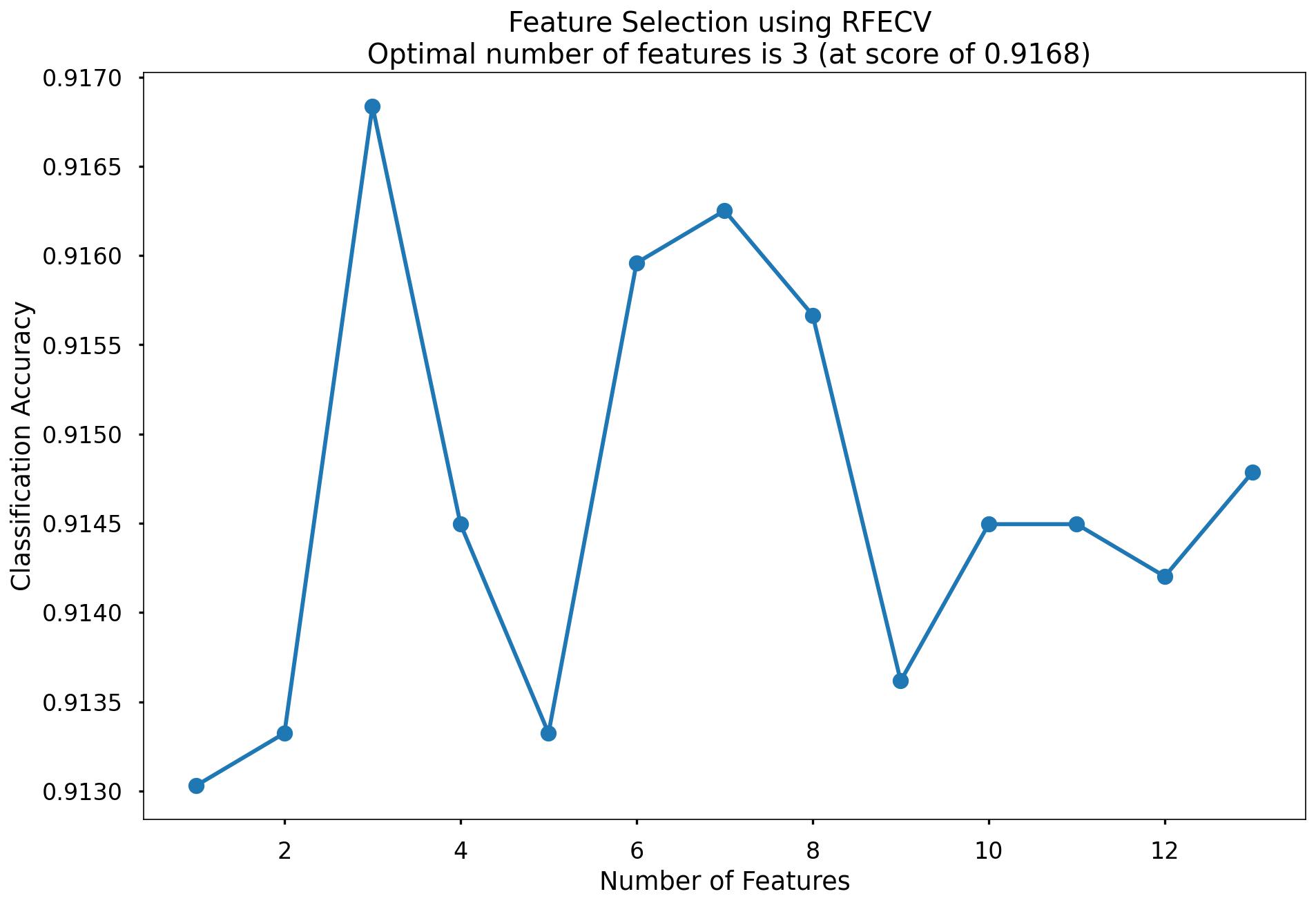
This creates the above plot, which shows us that the highest cross-validated classification accuracy (0.9168) is when we include 3 of our input variables such as income_annum, loan_amount, cibil_score. From the chart we can see that the difference is not high when we include all the 13 variables so it is negligible. We will continue on with all the 13 variables!
Model Training
Instantiating and training our Logistic Regression model is done using the below code. We use the random_state parameter to ensure reproducible results, meaning any refinements can be compared to past results. We also specify max_iter = 1000 to allow the solver more attempts at finding an optimal regression line, as the default value of 100 was not enough.
lr = LogisticRegression(random_state = 42, max_iter = 1000)

# fit our model using our training & test sets
lr.fit(X_train, y_train)
Model Performance Assessment
Predict On The Test Set
To assess how well our model is predicting on new data - we use the trained model object (here called clf) and ask it to predict the loan_status variable for the test set.
In the code below we create one object to hold the binary 1/0 predictions, and another to hold the actual prediction probabilities for the positive class.
# predict on the test set
y_pred_class = clf.predict(X_test)
y_pred_prob = clf.predict_proba(X_test)[:,1]
Confusion Matrix
A Confusion Matrix provides us a visual way to understand how our predictions match up against the actual values for those test set observations.
The below code creates the Confusion Matrix using the confusion_matrix functionality from within scikit-learn and then plots it using matplotlib.
# create the confusion matrix
conf_matrix = confusion_matrix(y_test, y_pred_class)

# plot the confusion matrix
plt.style.use("seaborn-poster")
plt.matshow(conf_matrix, cmap = "coolwarm")
plt.gca().xaxis.tick_bottom()
plt.title("Confusion Matrix")
plt.ylabel("Actual Class")
plt.xlabel("Predicted Class")
for (i, j), corr_value in np.ndenumerate(conf_matrix):
    plt.text(j, i, corr_value, ha = "center", va = "center", fontsize = 20)

plt.show()
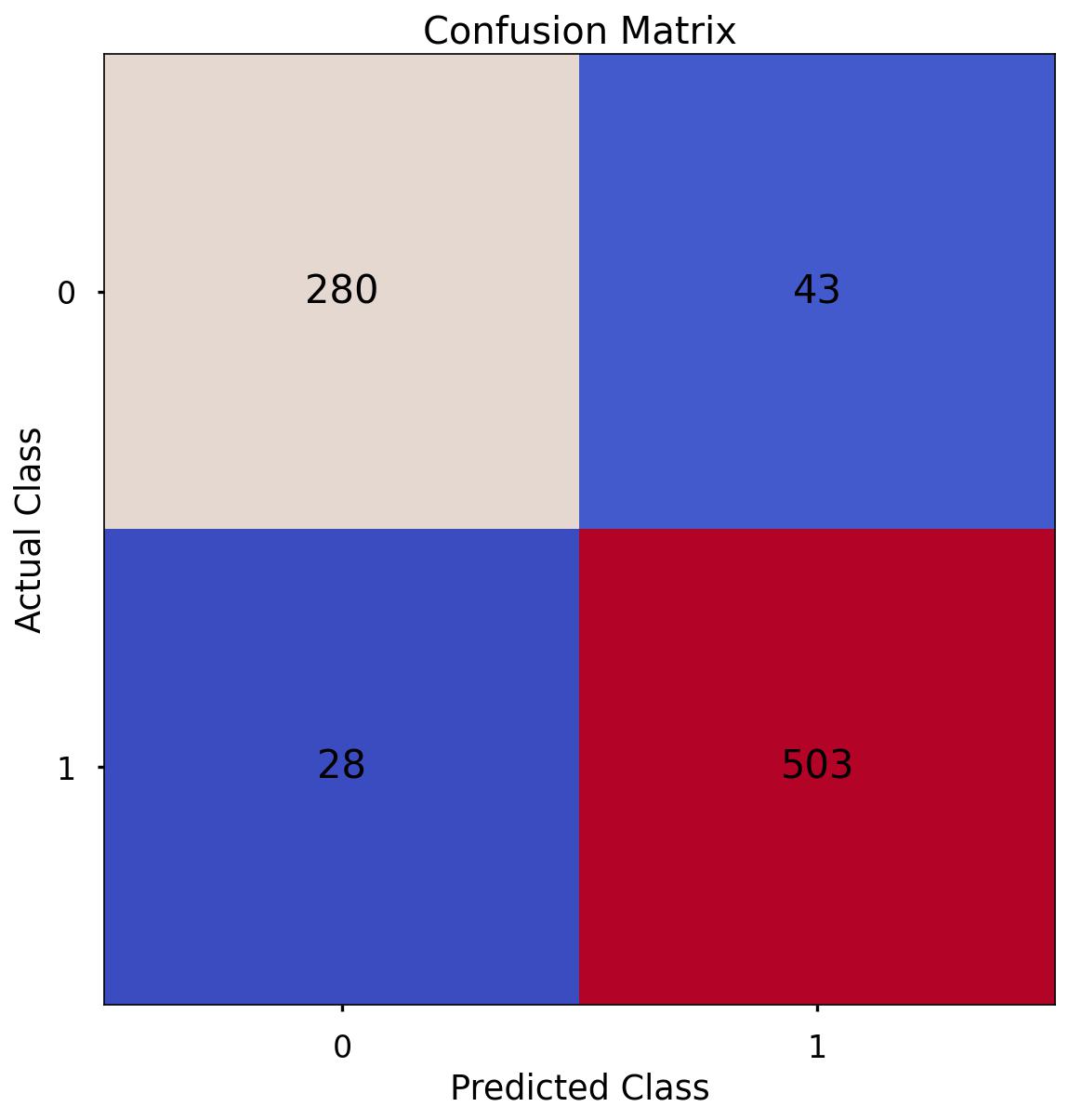
The aim is to have a high proportion of observations falling into the top left cell (predicted rejected and actual rejected) and the bottom right cell (predicted approved and actual approved).
Since the proportion of signups in our data was around 62:37 we will next analyse not only Classification Accuracy, but also Precision, Recall, and F1-Score which will help us assess how well our model has performed in reality.
The scores in the confusion matrix above mean:
- True negatives (upper left) : The number of applications that were rejected that the model accurately predicted were rejected.
- False negatives (bottom left): The number of applications that were approved that the model inaccurately predicted were rejected.
- False positives (upper right): The number of applications that were rejected that the model inaccurately predicted were approved.
- True positives (bottom right): The number of applications that were approved that the model accurately predicted were approved.
Classification Performance Metrics
Classification Accuracy
Classification Accuracy is a metric that tells us of all predicted observations, what proportion did we correctly classify. This is very intuitive, but when dealing with imbalanced classes, can be misleading.
An example of this could be a rare disease. A model with a 98% Classification Accuracy on might appear like a fantastic result, but if our data contained 98% of patients without the disease, and 2% with the disease - then a 98% Classification Accuracy could be obtained simply by predicting that no one has the disease - which wouldn’t be a great model in the real world. Luckily, there are other metrics which can help us!
In this example of the rare disease, we could define Classification Accuracy as of all predicted patients, what proportion did we correctly classify as either having the disease, or not having the disease
Precision & Recall
Precision is a metric that tells us of all observations that were predicted as positive, how many actually were positive
Keeping with the rare disease example, Precision would tell us of all patients we predicted to have the disease, how many actually did
Recall is a metric that tells us of all positive observations, how many did we predict as positive
Again, referring to the rare disease example, Recall would tell us of all patients who actually had the disease, how many did we correctly predict
The tricky thing about Precision & Recall is that it is impossible to optimise both - it’s a zero-sum game. If you try to increase Precision, Recall decreases, and vice versa. Sometimes however it will make more sense to try and elevate one of them, in spite of the other. In the case of our rare-disease prediction like we’ve used in our example, perhaps it would be more important to optimise for Recall as we want to classify as many positive cases as possible. In saying this however, we don’t want to just classify every patient as having the disease, as that isn’t a great outcome either!
So - there is one more metric we will discuss & calculate, which is actually a combination of both…
F1 Score
F1-Score is a metric that essentially “combines” both Precision & Recall. Technically speaking, it is the harmonic mean of these two metrics. A good, or high, F1-Score comes when there is a balance between Precision & Recall, rather than a disparity between them.
Overall, optimising your model for F1-Score means that you’ll get a model that is working well for both positive & negative classifications rather than skewed towards one or the other. To return to the rare disease predictions, a high F1-Score would mean we’ve got a good balance between successfully predicting the disease when it’s present, and not predicting cases where it’s not present.
Using all of these metrics in combination gives a really good overview of the performance of a classification model, and gives us an understanding of the different scenarios & considerations!
In the code below, we utilise in-built functionality from scikit-learn to calculate these four metrics.
print('Accuracy:', '%.3f' % accuracy_score(y_test, y_pred_class))
>> Accuracy: 0.917

print('Precision:', '%.3f' % precision_score(y_test, y_pred_class))
>> Precision: 0.921

print('Recall:', '%.3f' % recall_score(y_test, y_pred_class))
>> Recall: 0.947

print('F1 Score:', '%.3f' % f1_score(y_test, y_pred_class))
>> F1 Score: 0.934
-
Accuracy: We have an accuracy of around 0.917. This suggests that our model is correctly classifying around 91.7% of instances.
-
Precision: Precision measures how many of the predicted positive instances are actually positive. With a precision of around 0.921, it means that about 92.1% of the instances predicted as positive by our model are truly positive.
-
Recall: Recall, also known as sensitivity or true positive rate, indicates how many of the actual positive instances our model is capturing. With a recall of around 0.947, it means that our model is correctly identifying about 94.7% of the actual positive instances.
-
F1 Score: The F1 score is the harmonic mean of precision and recall and provides a balanced view of a model’s performance. With an F1 score of around 0.934, it indicates that the model is achieving a balanced trade-off between precision and recall.
Since our data is somewhat imbalanced, looking at these metrics rather than just Classification Accuracy on it’s own - is a good idea, and gives us a much better understanding of what our predictions mean! We will use these same metrics when applying other models for this task, and can compare how they stack up.
Finding Feature Importance
Printing the features in Descending order
# Get feature names (if using a DataFrame)
feature_names = X_train.columns if isinstance(X_train, pd.DataFrame) else np.arange(X_train.shape[1])

# Create a DataFrame to store feature names and their coefficients
feature_importance = pd.DataFrame({'Feature': feature_names, 'Coefficient': clf.coef_[0]})

# Sort by absolute coefficient values in descending order to find the most important features
feature_importance['Absolute_Coefficient'] = np.abs(feature_importance['Coefficient'])
feature_importance = feature_importance.sort_values(by='Absolute_Coefficient', ascending=False)

# Print or visualize the most important features
print(feature_importance)
Output:
| Feature | Coefficient | Absolute_Coefficient |
|---|---|---|
| cibil_score | 4.081895 | 4.081895 |
| income_annum | -1.626722 | 1.626722 |
| loan_amount | 1.368553 | 1.368553 |
| loan_term | -0.846972 | 0.846972 |
| education_Post Graduate | -0.385638 | 0.385638 |
| bank_asset_value | 0.172994 | 0.172994 |
| luxury_assets_value | 0.134816 | 0.134816 |
| commercial_assets_value | 0.068286 | 0.068286 |
| no_of_dependents | -0.064599 | 0.064599 |
| residential_assets_value | 0.035255 | 0.035255 |
| education_Not Graduate | 0.026293 | 0.026293 |
| gender_Male | 0.011976 | 0.011976 |
| self_employed_Yes | 0.006791 | 0.006791 |
The above table is based on ranking from highest to lowest features.
Based on our EDA, cibil_score & annual income are top ones. Here loan_amount is coming which we were actually seeing it because loan amount and loan income has strong positive correlation. Also, loan_term which we have seen in our exploratory data analysis comes as 4th important feature. Then surprisingly education_post_graduate has come as 5th important feature. We can see luxury & bank asset values as 6th & 7th feature importance.
For every unit increase in cibil_score, the loan approval gets increased by approximately 4%.
Finding The Optimal Classification Threshold
By default, most pre-built classification models & algorithms will just use a 50% probability to discern between a positive class prediction (loan status approved) and a negative class prediction (loan status rejected).
Just because 50% is the default threshold does not mean it is the best one for our task.
Here, we will test many potential classification thresholds, and plot the Precision, Recall & F1-Score, and find an optimal solution!
# set up the list of thresholds to loop through
thresholds = np.arange(0, 1, 0.01)

# create empty lists to append the results to
precision_scores = []
recall_scores = []
f1_scores = []

# loop through each threshold - fit the model - append the results
for threshold in thresholds:

    pred_class = (y_pred_prob >= threshold) * 1

    precision = precision_score(y_test, pred_class, zero_division = 0)
    precision_scores.append(precision)

    recall = recall_score(y_test, pred_class)
    recall_scores.append(recall)

    f1 = f1_score(y_test, pred_class)
    f1_scores.append(f1)


# extract the optimal f1-score (and it's index)
max_f1 = max(f1_scores)
max_f1_idx = f1_scores.index(max_f1)


# plot the results
plt.style.use("seaborn-poster")
plt.plot(thresholds, precision_scores, label = "Precision", linestyle = "--")
plt.plot(thresholds, recall_scores, label = "Recall", linestyle = "--")
plt.plot(thresholds, f1_scores, label = "F1", linewidth = 5)
plt.title(f"Finding the Optimal Threshold for Classification Model \n Max F1: {round(max_f1,2)} (Threshold = {round(thresholds[max_f1_idx],2)})")
plt.xlabel("Threshold")
plt.ylabel("Assessment Score")
plt.legend(loc = "lower left")
plt.tight_layout()
plt.show()
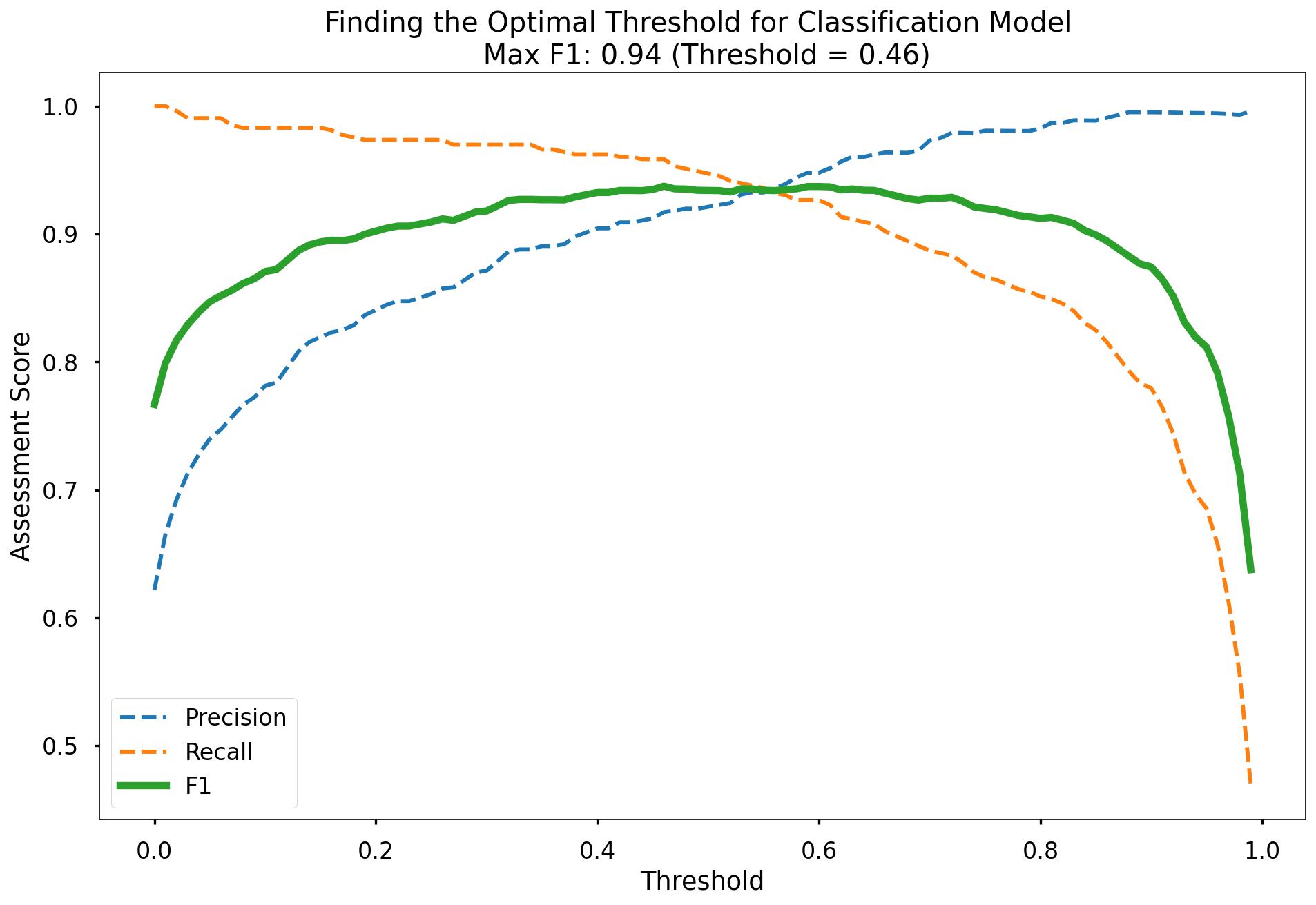
Along the x-axis of the above plot we have the different classification thresholds that were testing. Along the y-axis we have the performance score for each of our three metrics. As per the legend, we have Precision as a blue dotted line, Recall as an orange dotted line, and F1-Score as a thick green line. You can see the interesting “zero-sum” relationship between Precision & Recall and you can see that the point where Precision & Recall meet is where F1-Score is maximised.
As you can see at the top of the plot, the optimal F1-Score for this model 0.94 and this is obtained at a classification threshold of 0.46. This is higher than the F1-Score of 0.934 that we achieved at the default classification threshold of 0.50!
optimal_threshold = 0.46

y_pred_class_opt_thresh = (y_pred_prob >= optimal_threshold) * 1

y_pred_class_opt_thresh
>> array([1, 0, 1, 1, 1, 1, 1, 0, 1, 0, 0, 0, 1, 0, 1, 0, 1, 1, 1, 0, 1, 1,
       1, 1, 1, 1, 1, 1, 1, 1, 1, 0, 1, 1, 0, 1, 0, 0, 1, 0, 0, 1, 0, 1,
       1, 1, 1, 1, 0, 1, 1, 1, 1, 1, 0, 0, 1, 0, 1, 1, 1, 1, 0, 1, 1, 1,
       1, 0, 1, 1, 1, 0, 1, 1, 1, 0, 1, 1, 1, 1, 0, 1, 1, 0, 1, 1, 0, 0,
       1, 0, 1, 1, 1, 1, 0, 0, 1, 1, 0, 1, 1, 0, 1, 1, 1, 0, 1, 0, 1, 1,
       0, 0, 0, 1, 1, 0, 0, 1, 0, 1, 1, 1, 1, 1, 0, 0, 0, 0, 1, 1, 1, 1,
       1, 0, 1, 1, 1, 1, 0, 1, 1, 1, 0, 0, 1, 1, 1, 1, 0, 1, 1, 1, 1, 0,
       1, 1, 0, 1, 0, 1, 0, 1, 0, 1, 1, 1, 0, 1, 1, 1, 0, 1, 1, 1, 1, 1,
       1, 0, 1, 0, 1, 1, 1, 1, 1, 1, 1, 0, 1, 0, 1, 0, 0, 0, 1, 1, 0, 1,
       1, 1, 0, 0, 0, 1, 0, 1, 1, 0, 1, 0, 0, 0, 1, 1, 1, 1, 0, 0, 1, 1,
       0, 1, 1, 1, 0, 1, 0, 1, 1, 1, 0, 1, 1, 1, 0, 0, 1, 1, 0, 0, 0, 1,
       0, 1, 0, 0, 1, 1, 1, 1, 1, 1, 0, 0, 1, 0, 1, 0, 1, 1, 0, 1, 1, 0,
       1, 0, 0, 1, 0, 1, 1, 0, 1, 1, 0, 1, 1, 1, 1, 1, 1, 0, 0, 0, 0, 1,
       1, 0, 1, 1, 1, 1, 0, 1, 0, 0, 0, 0, 1, 1, 1, 0, 0, 0, 1, 1, 0, 1,
       1, 0, 0, 1, 1, 1, 1, 1, 1, 1, 0, 1, 1, 1, 1, 0, 1, 0, 0, 1, 1, 1,
       1, 1, 0, 0, 0, 1, 1, 1, 1, 1, 1, 1, 0, 0, 0, 0, 1, 0, 1, 1, 0, 1,
       1, 1, 1, 0, 1, 1, 1, 1, 0, 1, 1, 1, 0, 1, 1, 1, 1, 1, 1, 0, 0, 0,
       1, 1, 1, 0, 1, 1, 1, 1, 0, 0, 1, 1, 1, 0, 1, 1, 0, 1, 1, 1, 1, 1,
       1, 0, 1, 0, 1, 1, 1, 1, 0, 1, 0, 1, 0, 1, 1, 1, 1, 1, 0, 1, 1, 0,
       0, 1, 0, 0, 1, 1, 1, 1, 1, 1, 0, 1, 1, 1, 0, 1, 1, 1, 1, 1, 0, 1,
       0, 0, 0, 1, 1, 1, 1, 1, 1, 0, 1, 0, 1, 1, 1, 0, 0, 1, 1, 1, 1, 1,
       1, 1, 0, 0, 1, 0, 1, 0, 1, 1, 0, 0, 0, 1, 0, 0, 1, 0, 1, 1, 1, 1,
       1, 1, 0, 0, 1, 0, 0, 1, 1, 1, 0, 1, 1, 0, 0, 1, 1, 1, 1, 1, 1, 0,
       1, 0, 1, 0, 1, 1, 1, 1, 1, 1, 1, 0, 1, 1, 0, 1, 0, 1, 0, 1, 0, 1,
       0, 1, 1, 1, 1, 0, 0, 1, 0, 0, 1, 1, 1, 0, 0, 1, 1, 1, 1, 1, 1, 1,
       1, 1, 0, 1, 1, 1, 1, 1, 1, 0, 1, 0, 1, 0, 1, 1, 1, 1, 0, 0, 0, 1,
       1, 1, 1, 1, 1, 0, 1, 1, 1, 1, 1, 1, 0, 0, 0, 1, 1, 1, 1, 1, 1, 1,
       1, 1, 1, 1, 1, 1, 0, 1, 0, 1, 1, 1, 1, 0, 1, 0, 0, 1, 1, 0, 1, 1,
       1, 0, 1, 0, 0, 0, 1, 1, 0, 0, 0, 1, 0, 1, 0, 1, 0, 1, 0, 0, 1, 1,
       0, 1, 1, 0, 0, 0, 0, 0, 1, 1, 1, 0, 0, 1, 1, 0, 1, 1, 1, 0, 0, 1,
       1, 1, 0, 1, 0, 1, 1, 0, 1, 1, 0, 1, 1, 1, 1, 1, 1, 0, 1, 1, 1, 1,
       1, 0, 0, 1, 0, 1, 1, 1, 1, 0, 0, 1, 1, 0, 1, 1, 0, 0, 1, 1, 1, 1,
       1, 1, 1, 1, 0, 0, 0, 1, 0, 0, 1, 1, 0, 1, 1, 1, 0, 1, 1, 1, 1, 0,
       0, 1, 0, 0, 1, 0, 0, 0, 0, 0, 0, 1, 1, 0, 1, 1, 1, 0, 1, 0, 1, 1,
       1, 0, 0, 1, 0, 1, 1, 1, 1, 1, 1, 1, 0, 1, 1, 1, 0, 1, 0, 1, 0, 1,
       0, 1, 0, 1, 1, 1, 1, 0, 1, 1, 0, 0, 1, 0, 1, 1, 1, 1, 0, 1, 1, 0,
       0, 1, 1, 1, 1, 0, 1, 1, 1, 0, 1, 0, 1, 1, 1, 0, 1, 0, 1, 1, 0, 1,
       1, 1, 0, 1, 0, 1, 0, 0, 1, 1, 1, 1, 0, 1, 1, 1, 1, 1, 1, 0, 1, 1,
       1, 1, 1, 1, 1, 0, 1, 1, 0, 1, 0, 0, 0, 0, 1, 0, 0, 0])
Overall this model performed pretty well with f1-score of 94% being reached when we altered our probability threshold classification.
Decision Tree
We utlise the scikit-learn library within Python to model our data using Decision Tree. The code sections below are broken up into 5 key sections:
- Data Import
- Missing Values
- Data Preprocessing
- Model Training
- Model Performance Assessment
- Visualise Our Decision Tree
- Decision Tree Regularisation
Data Import
# import required packages
import pandas as pd
import pickle
import matplotlib.pyplot as plt
import numpy as np
from sklearn.tree import DecisionTreeClassifier, plot_tree
from sklearn.utils import shuffle
from sklearn.model_selection import train_test_split, cross_val_score, KFold
from sklearn.metrics import confusion_matrix, accuracy_score, precision_score, recall_score, f1_score
from sklearn.preprocessing import OneHotEncoder

df = pd.read_sql(query, database)

# dropping loan_id column
df_model = df[['no_of_dependents', 'gender', 'education', 'self_employed','income_annum', 'loan_amount',
               'loan_term', 'cibil_score','residential_assets_value','commercial_assets_value',
               'luxury_assets_value',  'bank_asset_value', 'loan_status']]

# label encoding
df_model["loan_status"]= df_model["loan_status"].map({"Approved":1,"Rejected":0})
Missing Values
We still however will put in place logic for missing values in the data.
- The number of missing values in the data is 0.
# checking for null values
df_model.isna().sum().sum()
>> 0
Data Preprocessing
Split Out Data For Modelling
In exactly the same way we did for Logistic Regression, in the next code block we do two things, we firstly split our data into an X object which contains only the predictor variables, and a y object that contains only our dependent variable.
Once we have done this, we split our data into training and test sets to ensure we can fairly validate the accuracy of the predictions on data that was not used in training. In this case, we have allocated 80% of the data for training, and the remaining 20% for validation. Again, we make sure to add in the stratify parameter to ensure that both our training and test sets have the same proportion of customers whose loan got approved, and rejected - meaning we can be more confident in our assessment of predictive performance.
# split data into X and y objects for modelling
X = df_model.drop(["loan_status"], axis = 1)
y = df_model["loan_status"]

# split out training & test sets
X_train, X_test, y_train, y_test = train_test_split(X, y, test_size = 0.2, random_state = 42, stratify = y)

print(X_train.shape)
>> (3415, 12)
print(X_test.shape)
>> (854, 12)
print(y_train.shape)
>> (3415,)
print(y_test.shape)
>> (854,)
Categorical Predictor Variables
In our dataset, we have three categorical variables gender, education, self_employed.
Just like the Logisitc Regression algorithm, the Decision Tree cannot deal with data in this format as it can’t assign any numerical meaning to it when looking to assess the relationship between the variable and the dependent variable.
For example gender doesn’t have any explicit order to it, in other words, Male isn’t higher or lower than Female and vice versa - we would again apply One Hot Encoding to all the three categorical columns.
# list of categorical variables that need encoding
categorical_vars = ["gender","education", "self_employed"]

# instantiate OHE class
one_hot_encoder = OneHotEncoder(sparse=False, drop = "first")

# apply OHE
X_train_encoded = one_hot_encoder.fit_transform(X_train[categorical_vars])
X_test_encoded = one_hot_encoder.transform(X_test[categorical_vars])

# extract feature names for encoded columns
encoder_feature_names = one_hot_encoder.get_feature_names_out(categorical_vars)

# turn objects back to pandas dataframe
X_train_encoded = pd.DataFrame(X_train_encoded, columns = encoder_feature_names)
X_train = pd.concat([X_train.reset_index(drop=True), X_train_encoded.reset_index(drop=True)], axis = 1)
X_train.drop(categorical_vars, axis = 1, inplace = True)

X_test_encoded = pd.DataFrame(X_test_encoded, columns = encoder_feature_names)
X_test = pd.concat([X_test.reset_index(drop=True), X_test_encoded.reset_index(drop=True)], axis = 1)
X_test.drop(categorical_vars, axis = 1, inplace = True)
Model Training
Instantiating and training our Decision Tree model is done using the below code. We use the random_state parameter to ensure we get reproducible results, and this helps us understand any improvements in performance with changes to model hyperparameters.
# instantiate our model object
dt = DecisionTreeClassifier(random_state = 42, max_depth = 5)

# fit our model using our training & test sets
dt.fit(X_train, y_train)
Model Performance Assessment
Predict On The Test Set
Just like we did with Logistic Regression, to assess how well our model is predicting on new data - we use the trained model object (here called dt) and ask it to predict the signup_flag variable for the test set.
In the code below we create one object to hold the binary 1/0 predictions, and another to hold the actual prediction probabilities for the positive class.
# predict on the test set

y_pred_class = dt.predict(X_test)
y_pred_prob = dt.predict_proba(X_test)[:,1]
Confusion Matrix
As we discussed in the above section applying Logistic Regression - a Confusion Matrix provides us a visual way to understand how our predictions match up against the actual values for those test set observations.
The below code creates the Confusion Matrix using the confusion_matrix functionality from within scikit-learn and then plots it using matplotlib.
# create the confusion matrix
conf_matrix = confusion_matrix(y_test, y_pred_class)

# plot the confusion matrix
plt.style.use("seaborn-poster")
plt.matshow(conf_matrix, cmap = "coolwarm")
plt.gca().xaxis.tick_bottom()
plt.title("Confusion Matrix")
plt.ylabel("Actual Class")
plt.xlabel("Predicted Class")
for (i, j), corr_value in np.ndenumerate(conf_matrix):
    plt.text(j, i, corr_value, ha = "center", va = "center", fontsize = 20)

plt.show()
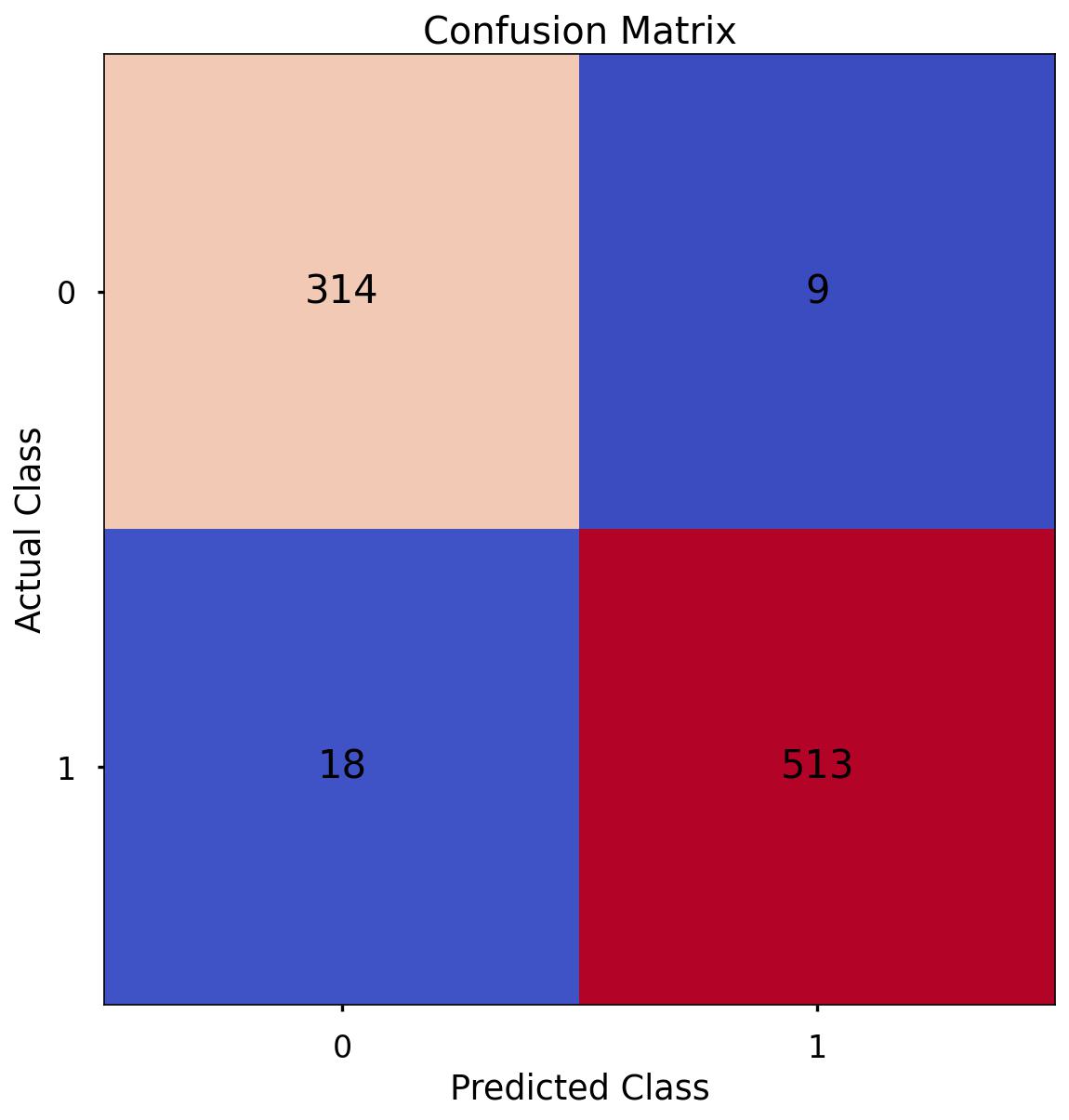
The aim is to have a high proportion of observations falling into the top left cell (predicted rejected and actual rejected) and the bottom right cell (predicted approved and actual approved).
Since the proportion of signups in our data was around 62:37 we will again analyse not only Classification Accuracy, but also Precision, Recall, and F1-Score as they will help us assess how well our model has performed from different points of view.
The scores in the confusion matrix above mean:
- True negatives (upper left) : The number of applications that were rejected that the model accurately predicted were rejected.
- False negatives (bottom left): The number of applications that were approved that the model inaccurately predicted were rejected.
- False positives (upper right): The number of applications that were rejected that the model inaccurately predicted were approved.
- True positives (bottom right): The number of applications that were approved that the model accurately predicted were approved.
Classification Performance Metrics
Accuracy, Precision, Recall, F1-Score
For details on these performance metrics, please see the above section on Logistic Regression. Using all four of these metrics in combination gives a really good overview of the performance of a classification model, and gives us an understanding of the different scenarios & considerations!
In the code below, we utilise in-built functionality from scikit-learn to calculate these four metrics.
print('Accuracy:', '%.3f' % accuracy_score(y_test, y_pred_class))
>> Accuracy: 0.968

print('Precision:', '%.3f' % precision_score(y_test, y_pred_class))
>> Precision: 0.983

print('Recall:', '%.3f' % recall_score(y_test, y_pred_class))
>> Recall: 0.966

print('F1 Score:', '%.3f' % f1_score(y_test, y_pred_class))
>> F1 Score: 0.974
-
Accuracy: We have an accuracy of around 0.968. This suggests that our model is correctly classifying around 90.9% of instances.
-
Precision: Precision measures how many of the predicted positive instances are actually positive. With a precision of around 0.983, it means that about 98.3% of the instances predicted as positive by our model are truly positive.
-
Recall: Recall, also known as sensitivity or true positive rate, indicates how many of the actual positive instances our model is capturing. With a recall of around 0.966, it means that our model is correctly identifying about 96.6% of the actual positive instances.
-
F1 Score: The F1 score is the harmonic mean of precision and recall and provides a balanced view of a model’s performance. With an F1 score of around 0.974, it indicates that the model is achieving a balanced trade-off between precision and recall.
These are all higher than what we saw when applying Logistic Regression, even after we had optimised the classification threshold!
Visualise Our Decision Tree
To see the decisions that have been made in the tree, we can use the plot_tree functionality that we imported from scikit-learn. To do this, we use the below code:
# plot the nodes of the decision tree
plt.figure(figsize=(25,15))
tree = plot_tree(dt,
                 feature_names = X.columns,
                 filled = True,
                 rounded = True,
                 fontsize = 16)
That code gives us the below plot:
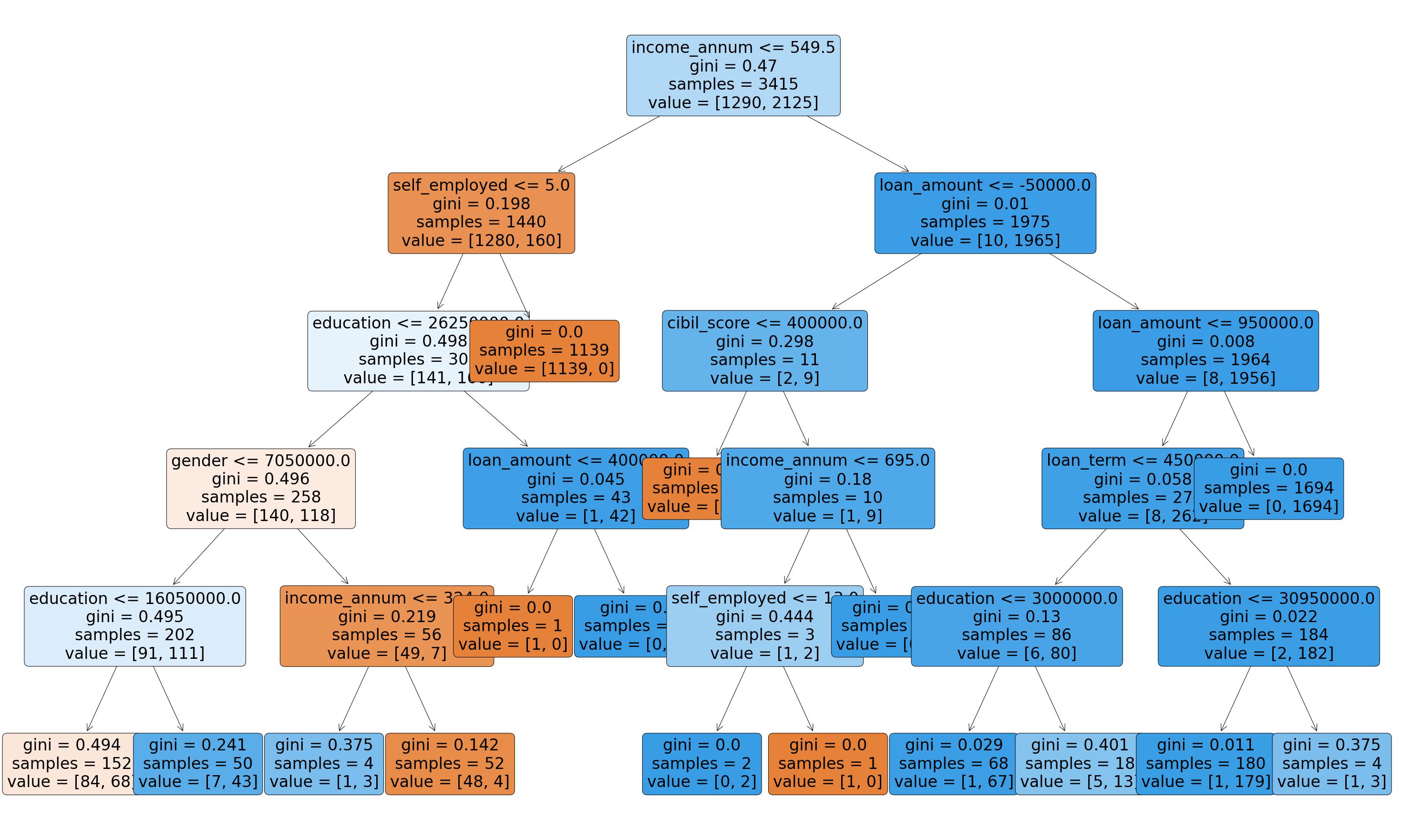
This is a very powerful visual, and one that can be shown to stakeholders in the business to ensure they understand exactly what is driving the predictions.
One interesting thing to note is that the very first split appears to be using the variable income_annum so it would seem that this is a very important variable when it comes to predicting loan status.
Decision Tree Regularisation
Decision Tree’s can be prone to over-fitting, in other words, without any limits on their splitting, they will end up learning the training data perfectly. We would much prefer our model to have a more generalised set of rules, as this will be more robust & reliable when making predictions on new data.
One effective method of avoiding this over-fitting, is to apply a max depth to the Decision Tree, meaning we only allow it to split the data a certain number of times before it is required to stop.
We initially trained our model with a placeholder depth of 5, but unfortunately, we don’t necessarily know the optimal number for this. Below we will loop over a variety of values and assess which gives us the best predictive performance!
# finding the best max_depth

# set up range for search, and empty list to append accuracy scores to
max_depth_list = list(range(1,15))
accuracy_scores = []

# loop through each possible depth, train and validate model, append test set f1-score
for depth in max_depth_list:

    dt = DecisionTreeClassifier(max_depth = depth, random_state = 42)
    dt.fit(X_train,y_train)
    y_pred = dt.predict(X_test)
    accuracy = f1_score(y_test,y_pred)
    accuracy_scores.append(accuracy)

# store max accuracy, and optimal depth
max_accuracy = max(accuracy_scores)
max_accuracy_idx = accuracy_scores.index(max_accuracy)
optimal_depth = max_depth_list[max_accuracy_idx]

# plot accuracy by max depth
plt.plot(max_depth_list,accuracy_scores)
plt.scatter(optimal_depth, max_accuracy, marker = "x", color = "red")
plt.title(f"Accuracy (F1 Score) by Max Depth \n Optimal Tree Depth: {optimal_depth} (F1 Score: {round(max_accuracy,4)})")
plt.xlabel("Max Depth of Decision Tree")
plt.ylabel("Accuracy (F1 Score)")
plt.tight_layout()
plt.show()
That code gives us the below plot:
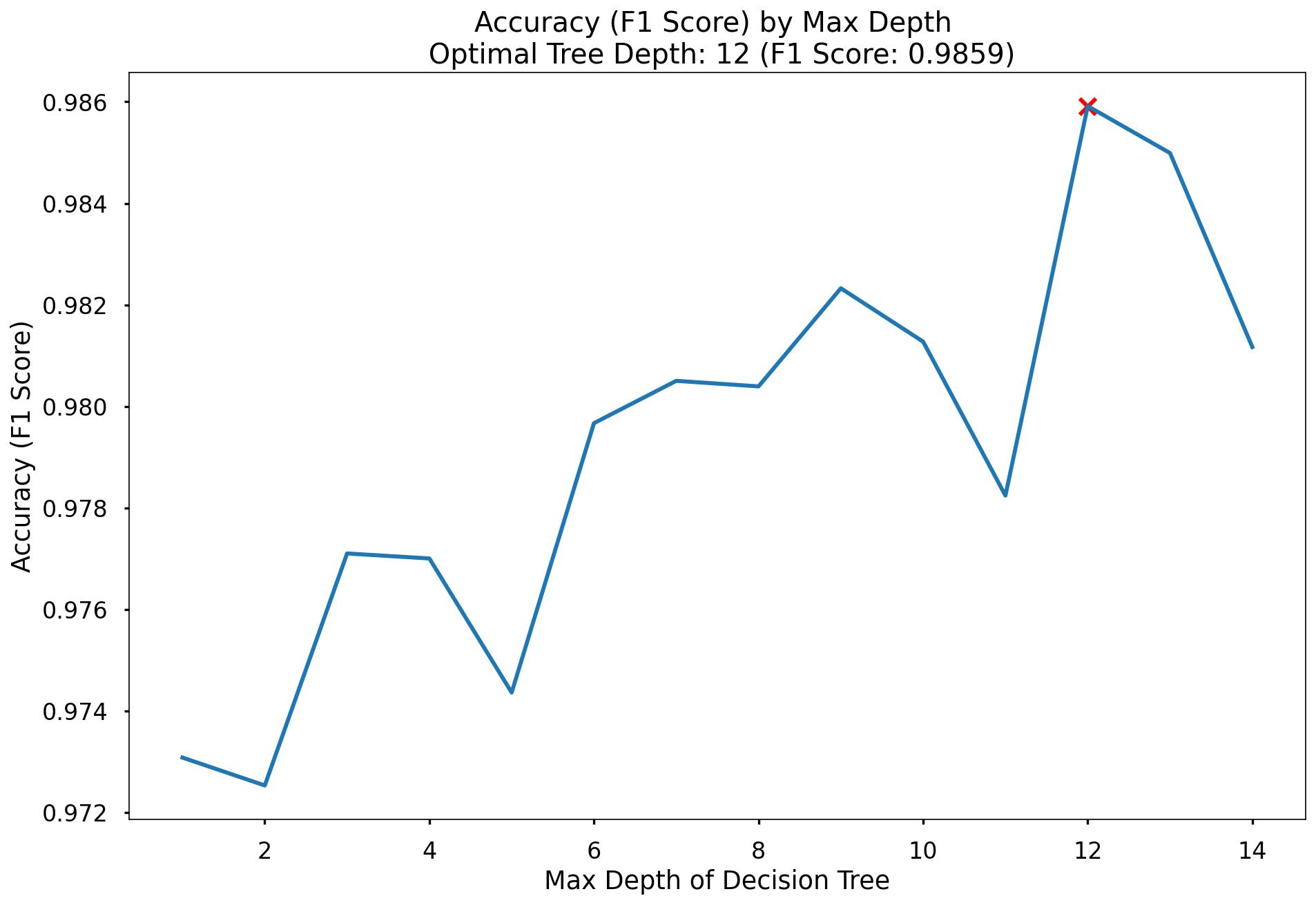
In the plot we can see that the maximum F1-Score on the test set is found when applying a max_depth value of 12 which takes our F1-Score up to 0.9859.
Random Forest
We utlise the scikit-learn library within Python to model our data using Random Forest. The code sections below are broken up into 5 key sections:
- Data Import
- Missing Values
- Data Preprocessing
- Model Training
- Model Performance Assessment
- Feature Importance
Data Import
# import required packages
import pandas as pd
import pickle
import matplotlib.pyplot as plt
import numpy as np
from sklearn.tree import DecisionTreeClassifier, plot_tree
from sklearn.utils import shuffle
from sklearn.model_selection import train_test_split, cross_val_score, KFold
from sklearn.metrics import confusion_matrix, accuracy_score, precision_score, recall_score, f1_score
from sklearn.preprocessing import OneHotEncoder

df = pd.read_sql(query, database)

# dropping loan_id column
df_model = df[['no_of_dependents', 'gender', 'education', 'self_employed','income_annum', 'loan_amount',
               'loan_term', 'cibil_score','residential_assets_value','commercial_assets_value',
               'luxury_assets_value',  'bank_asset_value', 'loan_status']]

# label encoding
df_model["loan_status"]= df_model["loan_status"].map({"Approved":1,"Rejected":0})
Missing Values
Again, this is exactly the same process we ran for Logistic Regression & the Decision Tree.
The number of missing values in the data is 0.
# checking for null values
df_model.isna().sum().sum()
>> 0
Data Preprocessing
Split Out Data For Modelling
In exactly the same way we did for both Logistic Regression & our Decision Tree, in the next code block we do two things, we firstly split our data into an X object which contains only the predictor variables, and a y object that contains only our dependent variable.
Once we have done this, we split our data into training and test sets to ensure we can fairly validate the accuracy of the predictions on data that was not used in training. In this case, we have allocated 80% of the data for training, and the remaining 20% for validation. Again, we make sure to add in the stratify parameter to ensure that both our training and test sets have the same proportion of customers who did, and did not, sign up for the delivery club - meaning we can be more confident in our assessment of predictive performance.
# split data into X and y objects for modelling
X = df_model.drop(["loan_status"], axis = 1)
y = df_model["loan_status"]

# split out training & test sets
X_train, X_test, y_train, y_test = train_test_split(X, y, test_size = 0.2, random_state = 42, stratify = y)

print(X_train.shape)
>> (3415, 12)

print(X_test.shape)
>> (854, 12)

print(y_train.shape)
>> (3415,)

print(y_test.shape)
>> (854,)
Categorical Predictor Variables
In our dataset, we have three categorical variables gender, education and self_employed.
Just like the Logistic Regression algorithm, Random Forests cannot deal with data in this format as it can’t assign any numerical meaning to it when looking to assess the relationship between the variable and the dependent variable.
For example gender doesn’t have any explicit order to it, in other words, Male isn’t higher or lower than Female and vice versa. We would again apply One Hot Encoding to all the three categorical columns.
# list of categorical variables that need encoding
categorical_vars = ["gender","education", "self_employed"]

# instantiate OHE class
one_hot_encoder = OneHotEncoder(sparse=False, drop = "first")

# apply OHE
X_train_encoded = one_hot_encoder.fit_transform(X_train[categorical_vars])
X_test_encoded = one_hot_encoder.transform(X_test[categorical_vars])

# extract feature names for encoded columns
encoder_feature_names = one_hot_encoder.get_feature_names_out(categorical_vars)

# turn objects back to pandas dataframe
X_train_encoded = pd.DataFrame(X_train_encoded, columns = encoder_feature_names)
X_train = pd.concat([X_train.reset_index(drop=True), X_train_encoded.reset_index(drop=True)], axis = 1)
X_train.drop(categorical_vars, axis = 1, inplace = True)

X_test_encoded = pd.DataFrame(X_test_encoded, columns = encoder_feature_names)
X_test = pd.concat([X_test.reset_index(drop=True), X_test_encoded.reset_index(drop=True)], axis = 1)
X_test.drop(categorical_vars, axis = 1, inplace = True)
Model Training
Instantiating and training our Random Forest model is done using the below code. We use the random_state parameter to ensure we get reproducible results, and this helps us understand any improvements in performance with changes to model hyperparameters.
We also look to build more Decision Trees in the Random Forest (500) than would be done using the default value of 100.
Lastly, since the default scikit-learn implementation of Random Forests does not limit the number of randomly selected variables offered up for splitting at each split point in each Decision Tree - we put this in place using the max_features parameter. This can always be refined later through testing, or through an approach such as gridsearch.
# instantiate our model object
rf = RandomForestClassifier(random_state = 42, n_estimators = 500, max_features = 5)

# fit our model using our training & test sets
rf.fit(X_train, y_train)
Model Performance Assessment
Predict On The Test Set
Just like we did with Logistic Regression & our Decision Tree, to assess how well our model is predicting on new data - we use the trained model object (here called rf) and ask it to predict the signup_flag variable for the test set.
In the code below we create one object to hold the binary 1/0 predictions, and another to hold the actual prediction probabilities for the positive class.
# predict on the test set

y_pred_class = rf.predict(X_test)
y_pred_prob = rf.predict_proba(X_test)[:,1]
Confusion Matrix
As we discussed in the above section applying Logistic Regression - a Confusion Matrix provides us a visual way to understand how our predictions match up against the actual values for those test set observations.
The below code creates the Confusion Matrix using the confusion_matrix functionality from within scikit-learn and then plots it using matplotlib.
# create the confusion matrix
conf_matrix = confusion_matrix(y_test, y_pred_class)

# plot the confusion matrix
plt.style.use("seaborn-poster")
plt.matshow(conf_matrix, cmap = "coolwarm")
plt.gca().xaxis.tick_bottom()
plt.title("Confusion Matrix")
plt.ylabel("Actual Class")
plt.xlabel("Predicted Class")
for (i, j), corr_value in np.ndenumerate(conf_matrix):
    plt.text(j, i, corr_value, ha = "center", va = "center", fontsize = 20)

plt.savefig('CP_9.jpg',bbox_inches='tight',dpi=150)
plt.show()
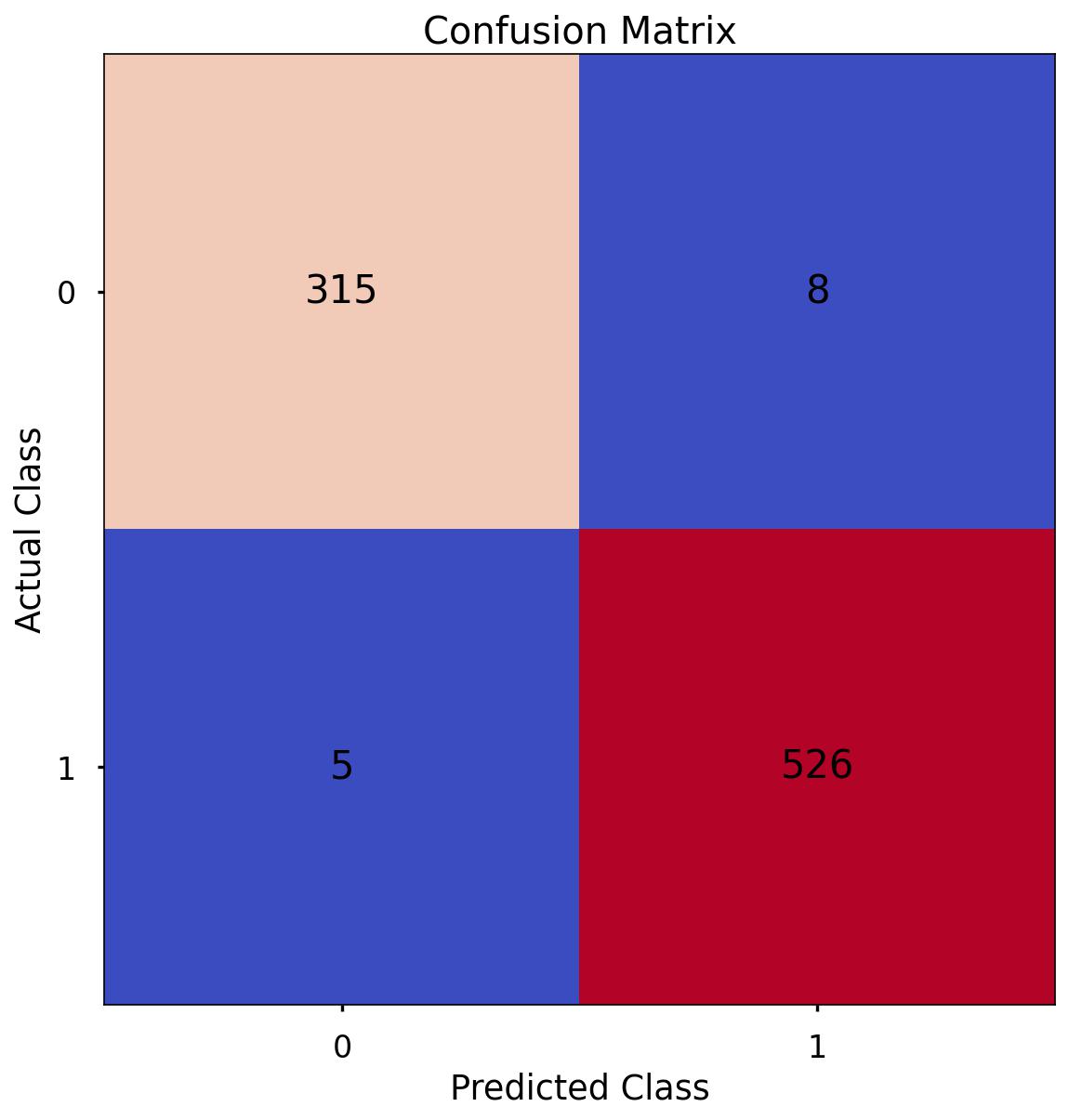
The aim is to have a high proportion of observations falling into the top left cell (predicted rejected and actual rejected) and the bottom right cell (predicted approved and actual approved).
Since the proportion of signups in our data was around 62:37 we will again analyse not only Classification Accuracy, but also Precision, Recall, and F1-Score as they will help us assess how well our model has performed from different points of view.
The scores in the confusion matrix above mean:
- True negatives (upper left) : The number of applications that were rejected that the model accurately predicted were rejected.
- False negatives (bottom left): The number of applications that were approved that the model inaccurately predicted were rejected.
- False positives (upper right): The number of applications that were rejected that the model inaccurately predicted were approved.
- True positives (bottom right): The number of applications that were approved that the model accurately predicted were approved.
Classification Performance Metrics
Accuracy, Precision, Recall, F1-Score
For details on these performance metrics, please see the above section on Logistic Regression. Using all four of these metrics in combination gives a really good overview of the performance of a classification model, and gives us an understanding of the different scenarios & considerations!
In the code below, we utilise in-built functionality from scikit-learn to calculate these four metrics.
print('Accuracy:', '%.3f' % accuracy_score(y_test, y_pred_class))
>> Accuracy: 0.985

print('Precision:', '%.3f' % precision_score(y_test, y_pred_class))
>> Precision: 0.985

print('Recall:', '%.3f' % recall_score(y_test, y_pred_class))
>> Recall: 0.991

print('F1 Score:', '%.3f' % f1_score(y_test, y_pred_class))
>> F1 Score: 0.988
-
Accuracy: We have an accuracy of around 0.968. This suggests that our model is correctly classifying around 90.9% of instances.
-
Precision: Precision measures how many of the predicted positive instances are actually positive. With a precision of around 0.983, it means that about 98.3% of the instances predicted as positive by our model are truly positive.
-
Recall: Recall, also known as sensitivity or true positive rate, indicates how many of the actual positive instances our model is capturing. With a recall of around 0.966, it means that our model is correctly identifying about 96.6% of the actual positive instances.
-
F1 Score: The F1 score is the harmonic mean of precision and recall and provides a balanced view of a model’s performance. With an F1 score of around 0.974, it indicates that the model is achieving a balanced trade-off between precision and recall.
These are all higher than what we saw when applying Logistic Regression, and marginally higher than what we got from our Decision Tree. If we are after out and out accuracy then this would be the best model to choose. If we were happier with a simpler, easier explain model, but that had almost the same performance - then we may choose the Decision Tree instead!.
Feature Importance
Random Forests are an ensemble model, made up of many, many Decision Trees, each of which is different due to the randomness of the data being provided, and the random selection of input variables available at each potential split point.
Because of this, we end up with a powerful and robust model, but because of the random or different nature of all these Decision trees - the model gives us a unique insight into how important each of our input variables are to the overall model.
As we’re using random samples of data, and input variables for each Decision Tree - there are many scenarios where certain input variables are being held back and this enables us a way to compare how accurate the models predictions are if that variable is or isn’t present.
So, at a high level, in a Random Forest we can measure importance by asking How much would accuracy decrease if a specific input variable was removed or randomised?
If this decrease in performance, or accuracy, is large, then we’d deem that input variable to be quite important, and if we see only a small decrease in accuracy, then we’d conclude that the variable is of less importance.
At a high level, there are two common ways to tackle this. The first, often just called Feature Importance is where we find all nodes in the Decision Trees of the forest where a particular input variable is used to split the data and assess what the gini impurity score (for a Classification problem) was before the split was made, and compare this to the gini impurity score after the split was made. We can take the average of these improvements across all Decision Trees in the Random Forest to get a score that tells us how much better we’re making the model by using that input variable.
If we do this for each of our input variables, we can compare these scores and understand which is adding the most value to the predictive power of the model!
The other approach, often called Permutation Importance cleverly uses some data that has gone unused at when random samples are selected for each Decision Tree (this stage is called “bootstrap sampling” or “bootstrapping”)
These observations that were not randomly selected for each Decision Tree are known as Out of Bag observations and these can be used for testing the accuracy of each particular Decision Tree.
For each Decision Tree, all of the Out of Bag observations are gathered and then passed through. Once all of these observations have been run through the Decision Tree, we obtain a classification accuracy score for these predictions.
In order to understand the importance, we randomise the values within one of the input variables - a process that essentially destroys any relationship that might exist between that input variable and the output variable - and run that updated data through the Decision Tree again, obtaining a second accuracy score. The difference between the original accuracy and the new accuracy gives us a view on how important that particular variable is for predicting the output.
Permutation Importance is often preferred over Feature Importance which can at times inflate the importance of numerical features. Both are useful, and in most cases will give fairly similar results.
Let’s put them both in place, and plot the results…
# calculate feature importance
feature_importance = pd.DataFrame(clf.feature_importances_)
feature_names = pd.DataFrame(X.columns)
feature_importance_summary = pd.concat([feature_names,feature_importance], axis = 1)
feature_importance_summary.columns = ["input_variable","feature_importance"]
feature_importance_summary.sort_values(by = "feature_importance",ascending=False, inplace = True)
feature_importance_summary
| input_variable | feature_importance |
|---|---|
| cibil_score | 0.816747 |
| loan_term | 0.065288 |
| loan_amount | 0.029542 |
| income_annum | 0.016843 |
| luxury_assets_value | 0.013493 |
| education_Post Graduate | 0.012536 |
| commercial_assets_value | 0.012152 |
| residential_assets_value | 0.012024 |
| bank_asset_value | 0.009939 |
| no_of_dependents | 0.005875 |
| education_Not Graduate | 0.002577 |
| self_employed_Yes | 0.001598 |
| gender_Male | 0.001387 |
# calculate permutation importance
result = permutation_importance(rf, X_test, y_test, n_repeats = 10, random_state = 42)
permutation_importance = pd.DataFrame(result["importances_mean"])
feature_names = pd.DataFrame(X_train.columns)
permutation_importance_summary = pd.concat([feature_names,permutation_importance], axis = 1)
permutation_importance_summary.columns = ["input_variable","permutation_importance"]
permutation_importance_summary.sort_values(by = "permutation_importance",ascending=False, inplace = True)
permutation_importance_summary
| input_variable | feature_importance |
|---|---|
| cibil_score | 0.422600 |
| loan_term | 0.047658 |
| loan_amount | 0.016628 |
| income_annum | 0.013466 |
| luxury_assets_value | 0.006089 |
| commercial_assets_value | 0.004450 |
| bank_asset_value | 0.001874 |
| self_employed_Yes | 0.001639 |
| no_of_dependents | 0.001522 |
| residential_assets_value | 0.000703 |
| gender_Male | 0.000351 |
| education_Post Graduate | 0.000234 |
| education_Not Graduate | -0.000351 |
The overall story from both approaches is very similar, in that by far, the most important or impactful input variables are cibil_score and loan_term.
We found that cibil_score stands out as the most important factor influencing the model’s predictions. One possible reason for this prominence could be that cibil_score has a notable relationship with the target variable loan_status. However, it’s important to note that correlation doesn’t imply causation. While cibil_score plays a crucial role in the model’s predictions, it’s important to remember that our model identifies patterns and associations in the data. The importance of a feature doesn’t necessarily mean it directly causes the predicted outcomes.In the context of our problem, cibil_score corresponds to credit scores. We should also consider that other factors, interactions between features, and potential noise in the data can influence these findings. Therefore, a holistic understanding of the model’s behavior requires taking these aspects into account. The insights from the feature importance analysis can guide us in making informed decisions and refining our strategies. It’s important to interpret these findings alongside other domain knowledge and analysis.
There are slight differences in the order or “importance” for the remaining variables but overall they have provided similar findings.
K Nearest Neighbours
We utlise the scikit-learn library within Python to model our data using KNN. The code sections below are broken up into 5 key sections:
- Data Import
- Data Preprocessing
- Model Training
- Performance Assessment
- Optimal Value For K
Data Import
# import required packages
import pandas as pd
import pickle
import matplotlib.pyplot as plt
import numpy as np
from sklearn.tree import DecisionTreeClassifier, plot_tree
from sklearn.utils import shuffle
from sklearn.model_selection import train_test_split, cross_val_score, KFold
from sklearn.metrics import confusion_matrix, accuracy_score, precision_score, recall_score, f1_score
from sklearn.preprocessing import OneHotEncoder

df = pd.read_sql(query, database)

# dropping loan_id column
df_model = df[['no_of_dependents', 'gender', 'education', 'self_employed','income_annum', 'loan_amount',
               'loan_term', 'cibil_score','residential_assets_value','commercial_assets_value',
               'luxury_assets_value',  'bank_asset_value', 'loan_status']]

# label encoding
df_model["loan_status"]= df_model["loan_status"].map({"Approved":1,"Rejected":0})
Missing Values
The number of missing values in the data is 0.
# checking for null values
df_model.isna().sum().sum()
>> 0
Data Preprocessing
Split Out Data For Modelling
In exactly the same way we’ve done for the other three models, in the next code block we do two things, we firstly split our data into an X object which contains only the predictor variables, and a y object that contains only our dependent variable.
Once we have done this, we split our data into training and test sets to ensure we can fairly validate the accuracy of the predictions on data that was not used in training. In this case, we have allocated 80% of the data for training, and the remaining 20% for validation. Again, we make sure to add in the stratify parameter to ensure that both our training and test sets have the same proportion of customers who did, and did not, sign up for the delivery club - meaning we can be more confident in our assessment of predictive performance.
# split data into X and y objects for modelling
X = df_model.drop(["loan_status"], axis = 1)
y = df_model["loan_status"]

# split out training & test sets
X_train, X_test, y_train, y_test = train_test_split(X, y, test_size = 0.2, random_state = 42, stratify = y)

print(X_train.shape)
>> (3415, 12)

print(X_test.shape)
>> (854, 12)

print(y_train.shape)
>> (3415,)

print(y_test.shape)
>> (854,)
Categorical Predictor Variables
As we saw when applying the other algorithms, in our dataset, we have three categorical variables gender, education, self_employed.
The KNN algorithm can’t deal with data in this format as it can’t assign any numerical meaning to it when looking to assess the relationship between the variable and the dependent variable.
For example gender doesn’t have any explicit order to it, in other words, Male isn’t higher or lower than Female and vice versa - one appropriate approach is to apply One Hot Encoding to all the three categorical column.
One Hot Encoding can be thought of as a way to represent categorical variables as binary vectors, in other words, a set of new columns for each categorical value with either a 1 or a 0 saying whether that value is true or not for that observation. These new columns would go into our model as input variables, and the original column is discarded.
We also drop one of the new columns using the parameter drop = “first”. We do this to avoid the dummy variable trap where our newly created encoded columns perfectly predict each other - and we run the risk of breaking the assumption that there is no multicollinearity, a requirement or at least an important consideration for some models, Linear Regression being one of them! Multicollinearity occurs when two or more input variables are highly correlated with each other, it is a scenario we attempt to avoid as in short, while it won’t neccessarily affect the predictive accuracy of our model, it can make it difficult to trust the statistics around how well the model is performing, and how much each input variable is truly having.
In the code, we also make sure to apply fit_transform to the training set, but only transform to the test set. This means the One Hot Encoding logic will learn and apply the “rules” from the training data, but only apply them to the test data. This is important in order to avoid data leakage where the test set learns information about the training data, and means we can’t fully trust model performance metrics!
For ease, after we have applied One Hot Encoding, we turn our training and test objects back into Pandas Dataframes, with the column names applied.
# list of categorical variables that need encoding
categorical_vars = ["gender","education", "self_employed"]

# instantiate OHE class
one_hot_encoder = OneHotEncoder(sparse=False, drop = "first")

# apply OHE
X_train_encoded = one_hot_encoder.fit_transform(X_train[categorical_vars])
X_test_encoded = one_hot_encoder.transform(X_test[categorical_vars])

# extract feature names for encoded columns
encoder_feature_names = one_hot_encoder.get_feature_names_out(categorical_vars)

# turn objects back to pandas dataframe
X_train_encoded = pd.DataFrame(X_train_encoded, columns = encoder_feature_names)
X_train = pd.concat([X_train.reset_index(drop=True), X_train_encoded.reset_index(drop=True)], axis = 1)
X_train.drop(categorical_vars, axis = 1, inplace = True)

X_test_encoded = pd.DataFrame(X_test_encoded, columns = encoder_feature_names)
X_test = pd.concat([X_test.reset_index(drop=True), X_test_encoded.reset_index(drop=True)], axis = 1)
X_test.drop(categorical_vars, axis = 1, inplace = True)
Feature Scaling
As KNN is a distance based algorithm, in other words it is reliant on an understanding of how similar or different data points are across different dimensions in n-dimensional space, the application of Feature Scaling is extremely important.
Feature Scaling is where we force the values from different columns to exist on the same scale, in order to enchance the learning capabilities of the model. There are two common approaches for this, Standardisation, and Normalisation.
Standardisation rescales data to have a mean of 0, and a standard deviation of 1 - meaning most datapoints will most often fall between values of around -4 and +4.
Normalisation rescales datapoints so that they exist in a range between 0 and 1.
The below code uses the in-built MinMaxScaler functionality from scikit-learn to apply Normalisation to all of our input variables. The reason we choose Normalisation over Standardisation is that our scaled data will all exist between 0 and 1, and these will then be compatible with any categorical variables that we have encoded as 1’s and 0’s.
In the code, we also make sure to apply fit_transform to the training set, but only transform to the test set. This means the scaling logic will learn and apply the scaling “rules” from the training data, but only apply them to the test data (or any other data we predict on in the future). This is important in order to avoid data leakage where the test set learns information about the training data, and means we can’t fully trust model performance metrics!
# create our scaler object
scale_norm = MinMaxScaler()

# normalise the training set (using fit_transform)
X_train = pd.DataFrame(scale_norm.fit_transform(X_train), columns = X_train.columns)

# normalise the test set (using transform only)
X_test = pd.DataFrame(scale_norm.transform(X_test), columns = X_test.columns)
Feature Selection
As we discussed when applying Logistic Regression above - Feature Selection is the process used to select the input variables that are most important to your Machine Learning task. For more information around this, please see that section above.
When applying KNN, Feature Selection is an interesting topic. The algorithm is measuring the distance between data-points across all dimensions, where each dimension is one of our input variables. The algorithm treats each input variable as equally important, there isn’t really a concept of “feature importance” so the spread of data within an unimportant variable could have an effect on judging other data points as either “close” or “far”. If we had a lot of “unimportant” variables in our data, this could create a lot of noise for the algorithm to deal with, and we’d just see poor classification accuracy without really knowing why.
Having a high number of input variables also means the algorithm has to process a lot more information when processing distances between all of the data-points, so any way to reduce dimensionality is important from a computational perspective as well.
For our task here we are again going to apply Recursive Feature Elimination With Cross Validation (RFECV) which is an approach that starts with all input variables, and then iteratively removes those with the weakest relationships with the output variable. RFECV does this using Cross Validation, so splits the data into many “chunks” and iteratively trains & validates models on each “chunk” seperately. This means that each time we assess different models with different variables included, or eliminated, the algorithm also knows how accurate each of those models was. From the suite of model scenarios that are created, the algorithm can determine which provided the best accuracy, and thus can infer the best set of input variables to use!
# instantiate RFECV & the model type to be utilised
from sklearn.ensemble import RandomForestClassifier
clf = RandomForestClassifier(random_state = 42)
feature_selector = RFECV(clf)

# fit RFECV onto our training & test data
fit = feature_selector.fit(X_train,y_train)


# extract & print the optimal number of features
optimal_feature_count = feature_selector.n_features_
print(f"Optimal number of features: {optimal_feature_count}")
>> Optimal number of features: 4


# limit our training & test sets to only include the selected variables
X_train_features = X_train.loc[:, feature_selector.get_support()]
X_train_features.columns
>> Index(['income_annum', 'loan_amount', 'loan_term', 'cibil_score'], dtype='object')
plt.style.use('seaborn-poster')
plt.plot(range(1, len(fit.cv_results_['mean_test_score']) + 1), fit.cv_results_['mean_test_score'], marker = "o")
plt.ylabel("Classification Accuracy")
plt.xlabel("Number of Features")
plt.title(f"Feature Selection using RFECV \n Optimal number of features is {optimal_feature_count} (at score of {round(max(fit.cv_results_['mean_test_score']),4)})")
plt.tight_layout()
plt.show()
The above code then produces a plot that visualises the cross-validated classification accuracy with each potential number of features
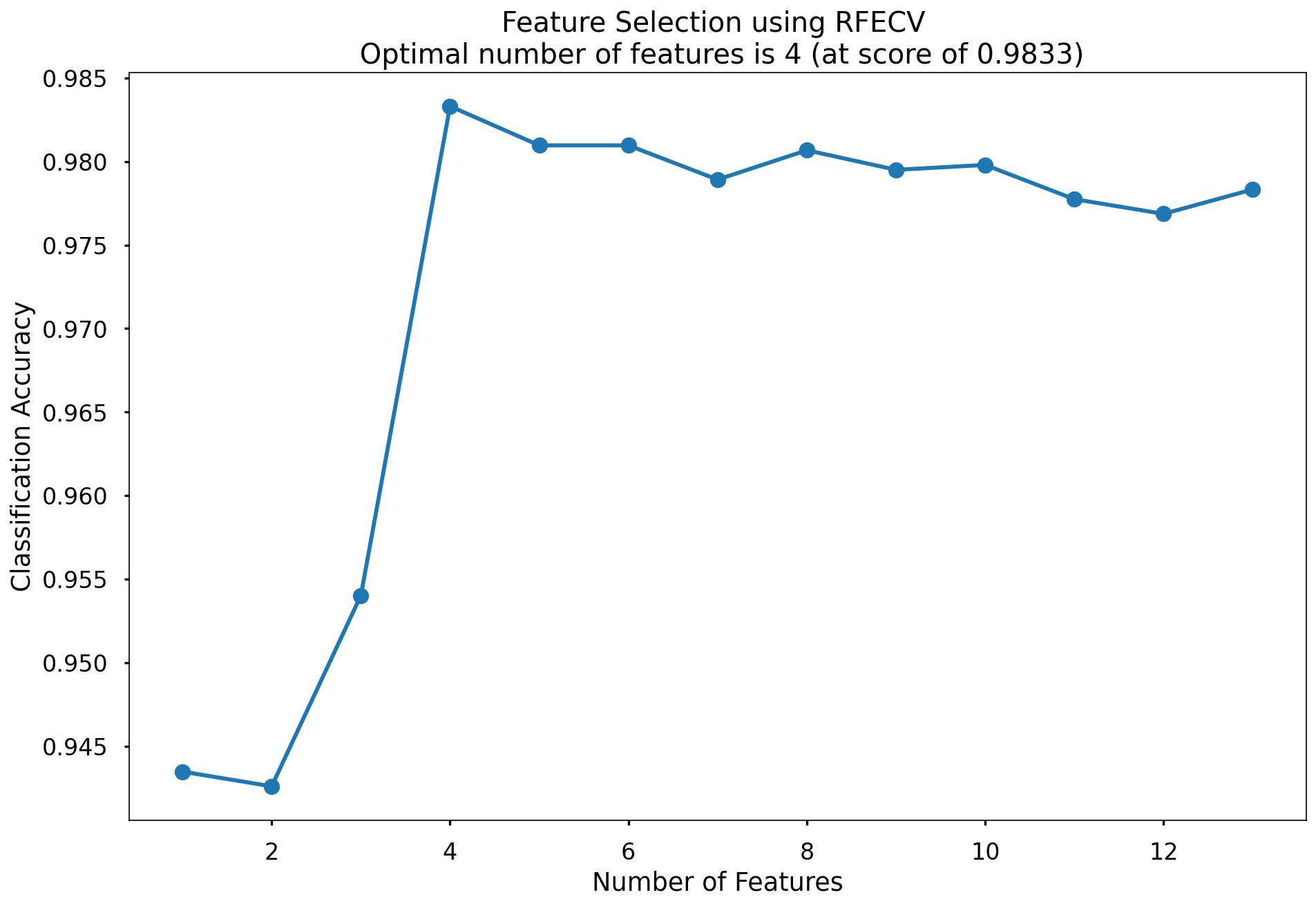
This creates the below plot, which shows us that the highest cross-validated classification accuracy (0.9833) is when we include 4 of our original input variables - although there isn’t much difference in predictive performance between using 4 variables through to 13 variables - and this syncs with what we saw in the Random Forest section above where only three of the input variables scored highly when assessing Feature Importance & Permutation Importance. So we go with all the 13 variables!.
Model Training
Instantiating and training our KNN model is done using the below code. At this stage we will just use the default parameters, meaning that the algorithm:
Will use a value for k of 5, or in other words it will base classifications based upon the 5 nearest neighbours Will use uniform weighting, or in other words an equal weighting to all 5 neighbours regardless of distance
# instantiate our model object
knn = KNeighborsClassifier()

# fit our model using our training & test sets
knn.fit(X_train, y_train)
Model Performance Assessment
Predict On The Test Set
To assess how well our model is predicting on new data - we use the trained model object (here called knn) and ask it to predict the loan_status variable for the test set.
In the code below we create one object to hold the binary 1/0 predictions, and another to hold the actual prediction probabilities for the positive class (which is based upon the majority class within the k nearest neighbours)
# predict on the test set

y_pred_class = rf.predict(X_test)
y_pred_prob = rf.predict_proba(X_test)[:,1]
Confusion Matrix
As we’ve seen with all models so far, our Confusion Matrix provides us a visual way to understand how our predictions match up against the actual values for those test set observations.
The below code creates the Confusion Matrix using the confusion_matrix functionality from within scikit-learn and then plots it using matplotlib.
# create the confusion matrix
conf_matrix = confusion_matrix(y_test, y_pred_class)

# plot the confusion matrix
plt.style.use("seaborn-poster")
plt.matshow(conf_matrix, cmap = "coolwarm")
plt.gca().xaxis.tick_bottom()
plt.title("Confusion Matrix")
plt.ylabel("Actual Class")
plt.xlabel("Predicted Class")
for (i, j), corr_value in np.ndenumerate(conf_matrix):
    plt.text(j, i, corr_value, ha = "center", va = "center", fontsize = 20)

plt.show()
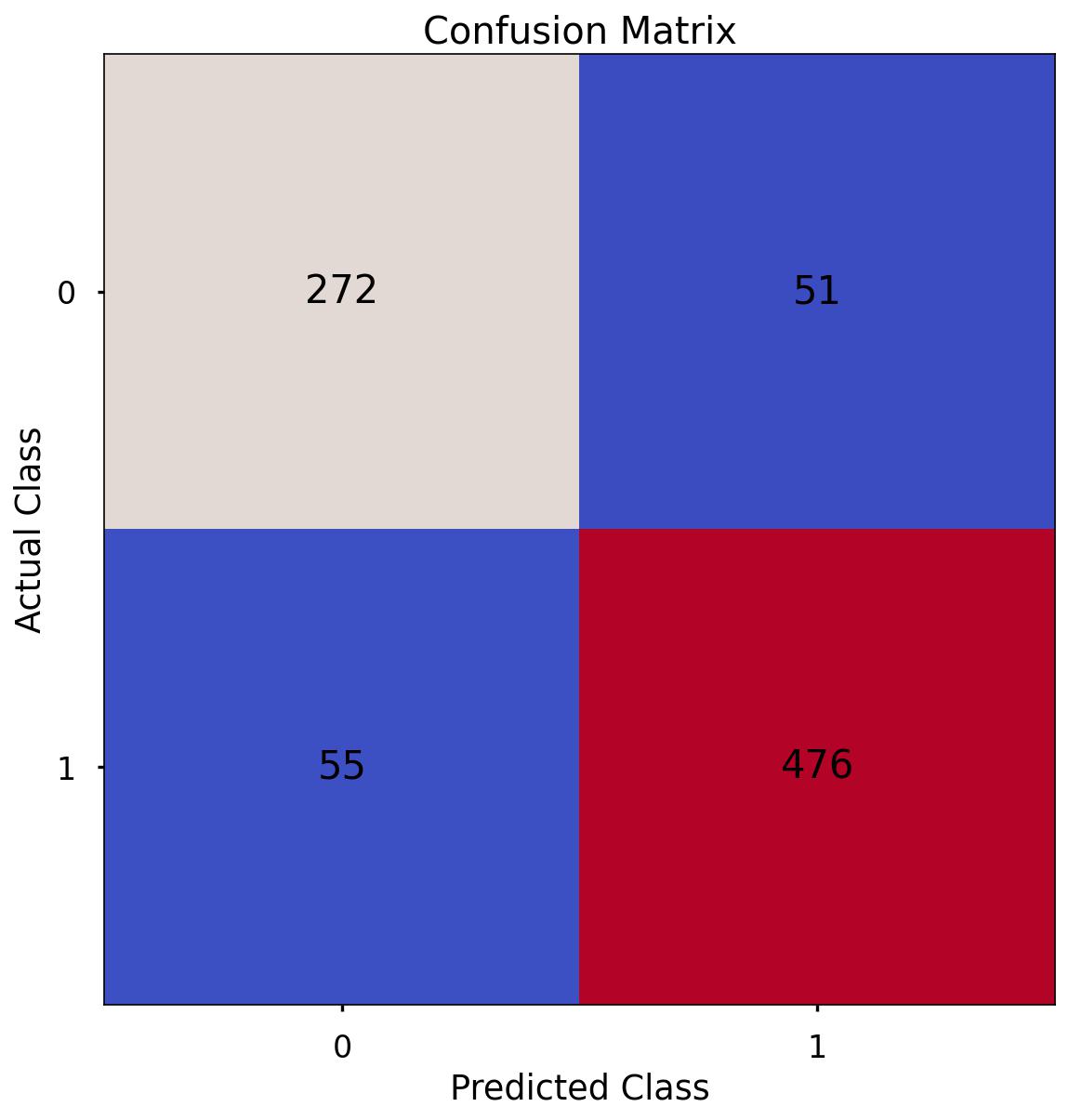
The aim is to have a high proportion of observations falling into the top left cell (predicted rejected and actual rejected) and the bottom right cell (predicted approved and actual approved).
Since the proportion of signups in our data was around 62:37 we will next analyse not only Classification Accuracy, but also Precision, Recall, and F1-Score which will help us assess how well our model has performed in reality.
The scores in the confusion matrix above mean:
- True negatives (upper left) : The number of applications that were rejected that the model accurately predicted were rejected.
- False negatives (bottom left): The number of applications that were approved that the model inaccurately predicted were rejected.
- False positives (upper right): The number of applications that were rejected that the model inaccurately predicted were approved.
- True positives (bottom right): The number of applications that were approved that the model accurately predicted were approved.
Classification Performance Metrics
Accuracy, Precision, Recall, F1-Score
For details on these performance metrics, please see the above section on Logistic Regression. Using all four of these metrics in combination gives a really good overview of the performance of a classification model, and gives us an understanding of the different scenarios & considerations!
In the code below, we utilise in-built functionality from scikit-learn to calculate these four metrics.
print('Accuracy:', '%.3f' % accuracy_score(y_test, y_pred_class))
>> Accuracy: 0.876
print('Precision:', '%.3f' % precision_score(y_test, y_pred_class))
>> Precision: 0.903
print('Recall:', '%.3f' % recall_score(y_test, y_pred_class))
>> Recall: 0.896
print('F1 Score:', '%.3f' % f1_score(y_test, y_pred_class))
>> F1 Score: 0.900
-
Accuracy: We have an accuracy of around 0.876. This suggests that our model is correctly classifying around 90.9% of instances.
-
Precision: Precision measures how many of the predicted positive instances are actually positive. With a precision of around 0.903, it means that about 90.3% of the instances predicted as positive by our model are truly positive.
-
Recall: Recall, also known as sensitivity or true positive rate, indicates how many of the actual positive instances our model is capturing. With a recall of around 0.896, it means that our model is correctly identifying about 89.6% of the actual positive instances.
-
F1 Score: The F1 score is the harmonic mean of precision and recall and provides a balanced view of a model’s performance. With an F1 score of around 0.900, it indicates that the model is achieving a balanced trade-off between precision and recall.
Finding Optimal Value of K
By default, the KNN algorithm within scikit-learn will use k = 5 meaning that classifications are based upon the five nearest neighbouring data-points in n-dimensional space.
Just because this is the default threshold does not mean it is the best one for our task.
Here, we will test many potential values for k, and plot the Precision, Recall & F1-Score, and find an optimal solution!
# set up range for search, and empty list to append accuracy scores to
k_list = list(range(2,25))
accuracy_scores = []

# loop through each possible value of k, train and validate model, append test set f1-score
for k in k_list:

    clf = KNeighborsClassifier(n_neighbors = k)
    clf.fit(X_train,y_train)
    y_pred = clf.predict(X_test)
    accuracy = f1_score(y_test,y_pred)
    accuracy_scores.append(accuracy)

# store max accuracy, and optimal k value
max_accuracy = max(accuracy_scores)
max_accuracy_idx = accuracy_scores.index(max_accuracy)
optimal_k_value = k_list[max_accuracy_idx]

# plot accuracy by max depth
plt.plot(k_list,accuracy_scores)
plt.scatter(optimal_k_value, max_accuracy, marker = "x", color = "red")
plt.title(f"Accuracy (F1 Score) by k \n Optimal Value for k: {optimal_k_value} (Accuracy: {round(max_accuracy,4)})")
plt.xlabel("k")
plt.ylabel("Accuracy (F1 Score)")
plt.tight_layout()
plt.savefig('CP_12.jpg',bbox_inches='tight',dpi=150)
plt.show()
That code gives us the below plot - which visualises the results!
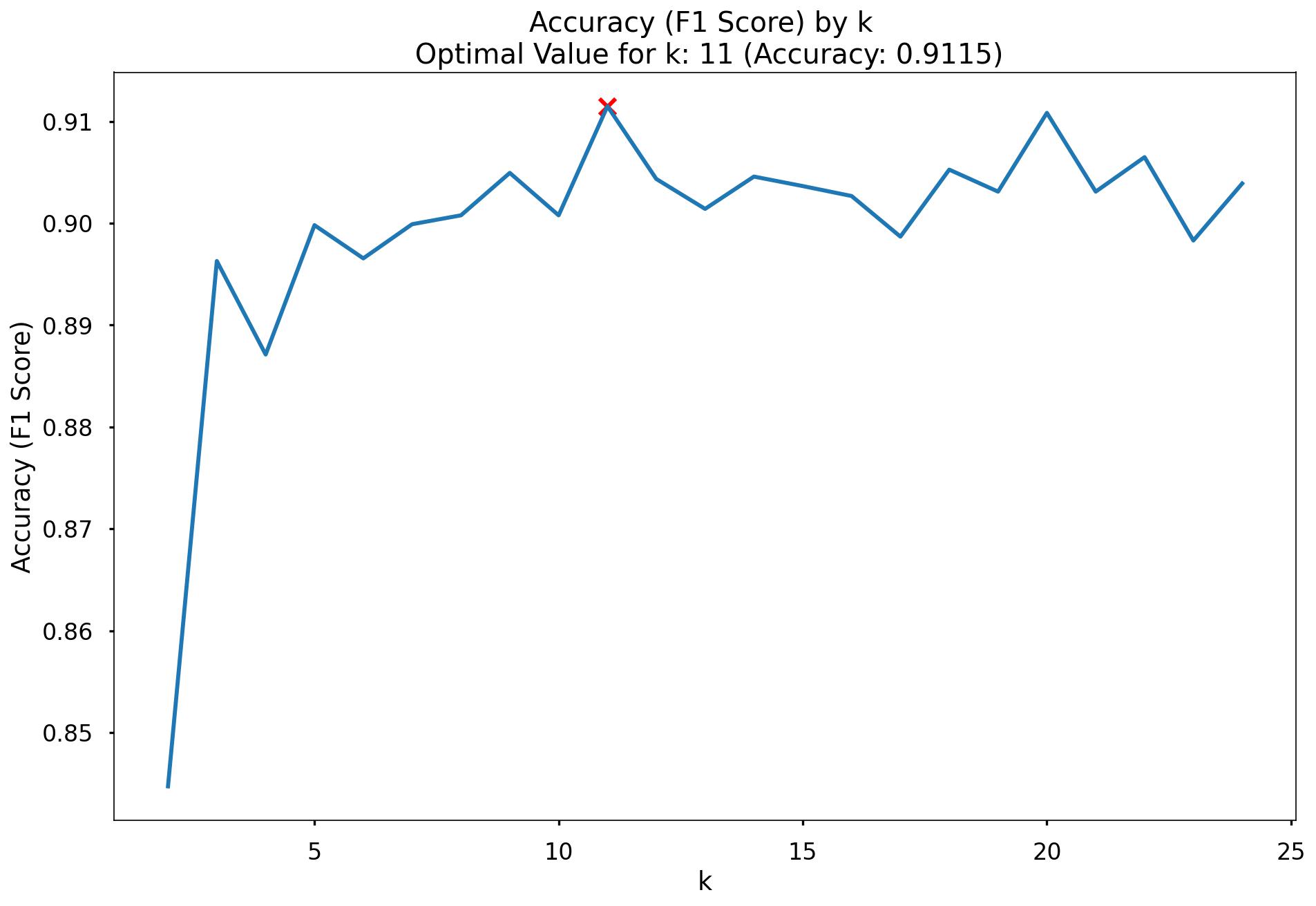
In the plot we can see that the maximum F1-Score on the test set is found when applying a k value of 11. We started with k=5, so we need to change!
Modelling Summary
The goal was to build a model that would accurately predict the loan_status which will be helpful in determining the creditworthiness of future applicants.
The chosen model is the Random Forest as it was
a) the most consistently performant on the test set across classification accuracy, precision, recall, and f1-score.
b) the feature importance and permutation importance allows the client an understanding of the key drivers behind loan_status.
Metric 1: Classification Accuracy
- Random Forest = 0.985
- Decision Tree = 0.968
- Logistic Regression = 0.917
- KNN = 0.876
Metric 2: Precision
- Random Forest = 0.985
- Decision Tree = 0.983
- Logistic Regression = 0.921
- KNN = 0.903
Metric 3: Recall
- Random Forest = 0.991
- Decision Tree = 0.966
- Logistic Regression = 0.947
- KNN = 0.896
Metric 4: F1 Score
- Random Forest = 0.988
- Decision Tree = 0.974
- Logistic Regression = 0.934
- KNN = 0.900
Conclusion
Based on the exploratory data analysis performed using SQL, PowerBI and Python it is found that the major factors affecting the loan approval or rejection are
- Cibil_score
- annual_income
- loan_term
Random_Forest is the chosen model.
Growth & Next Steps
While predictive accuracy was relatively high - other modelling approaches could be tested, especially those somewhat similar to Random Forest, for example XGBoost, LightGBM to see if even more accuracy could be gained.
While the model demonstrates strong performance, further improvements can be made by incorporating additional relevant features such as alternative credit signals (e.g., transaction behavior, repayment history, or digital footprint data). Additionally, advanced feature engineering techniques and hyperparameter tuning can be applied to further enhance model performance.
From a business perspective, optimizing the classification threshold to reduce false positives (i.e., approving risky applicants) would be critical to minimize financial losses because Saving from bad loans ( False positives ) > losing some good customers ( False negatives )
While the model is already well balanced in terms of false positives and false negatives, from a business perspective, further optimization of the decision threshold can be explored depending on the company’s risk appetite. In lending scenarios, reducing false positives (approving risky applicants) may be prioritized even at the cost of slightly increasing false negatives.